


Keeping apps on your Android devices up to date is essential—not only to access the latest features but also to ensure security and optimal performance. Updates often include security patches that protect against vulnerabilities, bug fixes that enhance stability, and optimizations that make apps run more efficiently.
In corporate environments or when managing a large number of devices, manually handling these updates can be time-consuming and impractical. This is where Applivery becomes invaluable.
Control app updates and update time #
Regularly updating applications on your organization’s devices ensures that users benefit from the newest functionalities, enhanced security, and greater reliability.
App updates are managed by Google through the Google Play Services and Applivery can not force the update of an App (you can read more about this here).
Many factors may affect the update timings.
- Default update behavior: In the default setting, applications automatically update when specific conditions are fulfilled:
- The device connects to a Wi-Fi network.
- The device is in charging mode.
- The device is not in active use.
- The application scheduled for an update is not open in the foreground.
Google Play usually conducts checks for application updates daily. Therefore, it might take a maximum of 24 hours for an application update to enter the update queue. Once an application is queued, it will automatically update the next time the above conditions are satisfied.
You can override the update settings to further customize the app update behavior on the devices you manage:
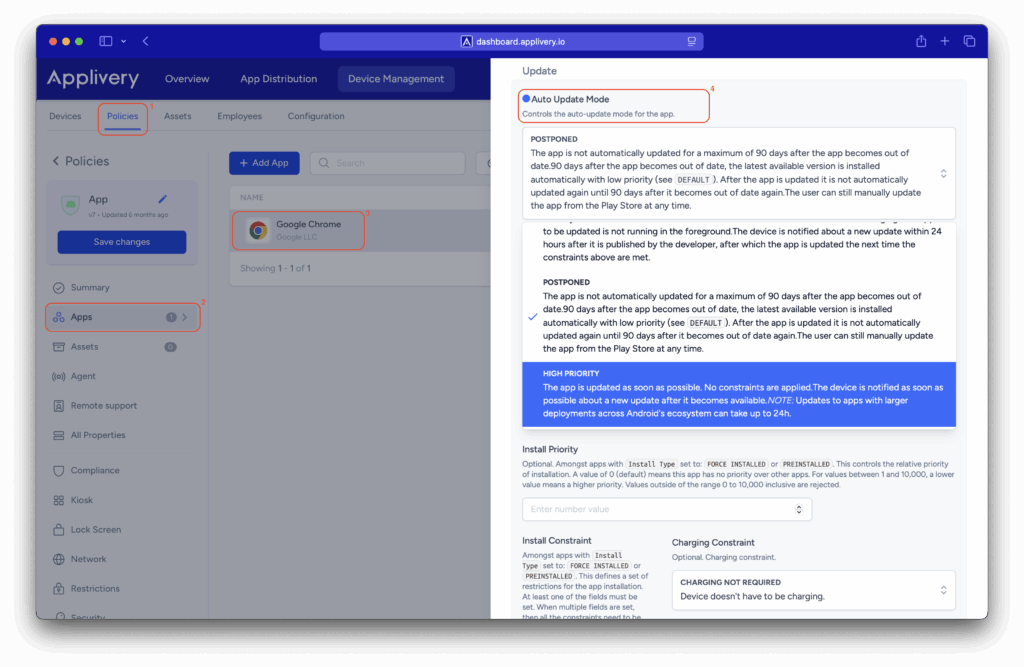
- High Priority: this mode guarantees that your app stays up-to-date, updating it immediately upon approval by Google Play. In case your device is offline when an update is released, it will update automatically the moment you reconnect to the internet.
- Postpone mode: use this option if want to pause updates for an app that prevents the app to automatically updated for an initial 90 days after it first became out of date. After this 90 day period, the latest available version of the app is automatically installed using the default update mode. After the app is updated to the latest available version, a new 90 day postponement period will begin from the next time that the developer publishes a new version of the app.
To modify the update mode go to any of your Policies (1), look for the Apps (2) section from the left side menu, and then click the App you want to modify (3) the update mode.
Find the Auto Update Mode (4) option under the right side appearing slide and choose your preferred option.
App auto update policy #
As an alternative, for default configurations under Auto Update Mode, you can specify when updates should occur by configuring the App Auto Update Policy. You can find this setting by navigating to your policy, selecting Restrictions (5), opening the Apps (6) tab, and locating the App Auto Update Policy (7) configuration.
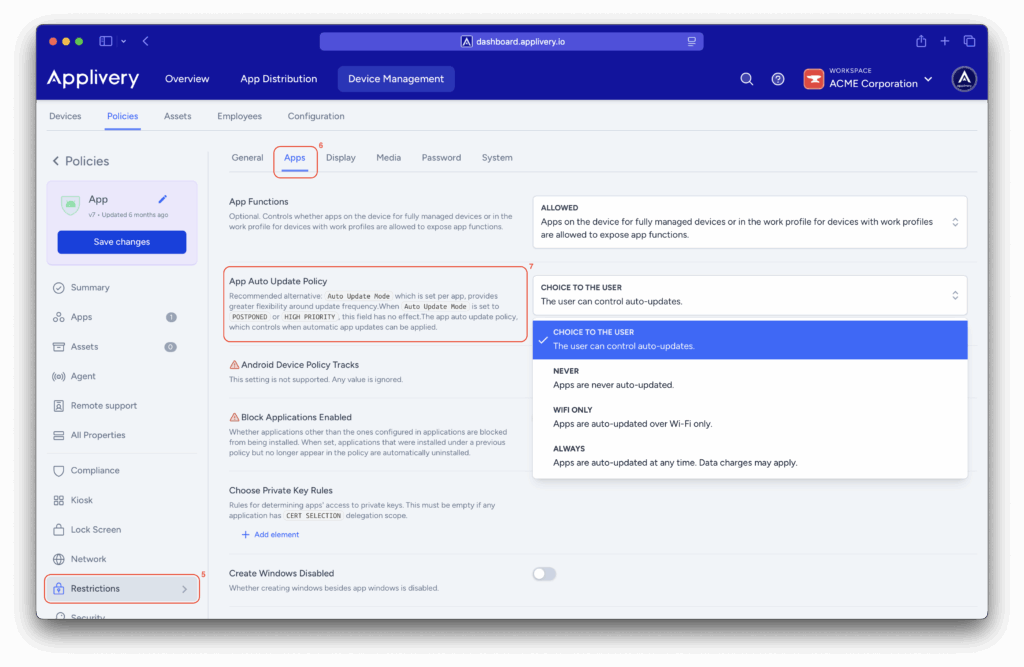
Here, you’ll have several options to tailor app updates to your needs:
- CHOICE TO THE USER: This option gives the end user full control over automatic updates. The policy administrator does not impose any restrictions, allowing the user to decide when and how to update apps.
- NEVER: This mode completely disables automatic updates. Apps will not update on their own; the only way to update an app is manually through the app store.
- WIFI ONLY: Apps will update automatically only when the device is connected to a Wi-Fi network. This helps avoid using mobile data for large updates.
- ALWAYS: Apps update automatically as soon as a new version is available, regardless of the network connection (Wi-Fi or mobile data). This is the most aggressive option and may incur mobile data charges if not monitored.
Managing app updates is a key part of maintaining a secure and efficient Android environment, especially across large device fleets.
By leveraging different update modes along with user-control options, you can strike the right balance between security and operational flexibility. A strategic approach to updates ensures devices are protected against the latest threats, benefit from performance improvements, and minimizes disruptions to end-user productivity.
Ultimately, a well-defined update management policy gives you complete control over your Android ecosystem, keeping every app up to date and fully optimized without compromising efficiency or security.