

Applivery UEM lets you manage Apple Vision Pro in enterprise environments by deploying network, identity, security and remote control configurations in a fully automated way, no user interaction required, no physical access to the device.

Without this approach, the Vision Pro introduces operational friction, manual configuration dependencies and security risks from day one. With Applivery, the device plugs straight into your corporate infrastructure as a managed endpoint from the moment it’s switched on.
What connectivity configurations does Applivery support
The platform deploys the full network configuration silently before the device is used for the first time.
| Configuration type | Supported capabilities | Outcome |
|---|---|---|
|
Wi-Fi |
WPA2/WPA3 Enterprise, 802.1X (PEAP, TLS, TTLS, EAP-FAST) |
Automatic connection to corporate network |
|
VPN |
KEv2, IPsec, L2TP, per-app VPN, Always-On VPN |
Continuous secure access |
|
Proxy |
Manual, automatic, PAC |
Network traffic control |
|
DNS & filtering |
DoH, DoT, OS-level web filtering |
Security without additional agents |
All configurations are applied without user intervention as part of the enrollment process.
How to manage identity and authentication in visionOS environments
Applivery lets you pre-configure corporate accounts and centralise authentication from first use.
| Element | Support |
|---|---|
|
Accounts |
Exchange (M365), Google, IMAP/SMTP, LDAP |
|
Calendar & contacts |
CalDAV, CardDAV |
|
SSO |
Entra ID, Okta, Ping Identity |
|
Active Directory |
Kerberos SSO |
|
Enrollment |
Authentication during device onboarding |
The user signs in once and gets immediate access to all corporate services.
What security policies can be enforced
Applivery lets you enforce security policies centrally, with no opt-out for the end user.
| Policy | Functionality |
|---|---|
|
Passcode |
Complexity, length, expiration, wipe after failed attempts |
|
Restrictions |
App Store lock, hardware controls |
|
Updates |
Forced software update management |
|
Attestation |
Cryptographic verification via Secure Enclave (M2) |
Hardware verification ensures only legitimate devices can access corporate resources.
How to manage certificates in corporate environments
Certificate management secures access to networks and services without any manual steps.
| Type | Support |
|---|---|
|
Protocols |
SCEP, NDES |
|
Formats |
PEM, PKCS#1, PKCS#12 |
|
Validation |
OCSP, CRL, Certificate Transparency |
Applivery automates this process as part of the device configuration flow.
What remote commands does Applivery support on Apple Vision Pro
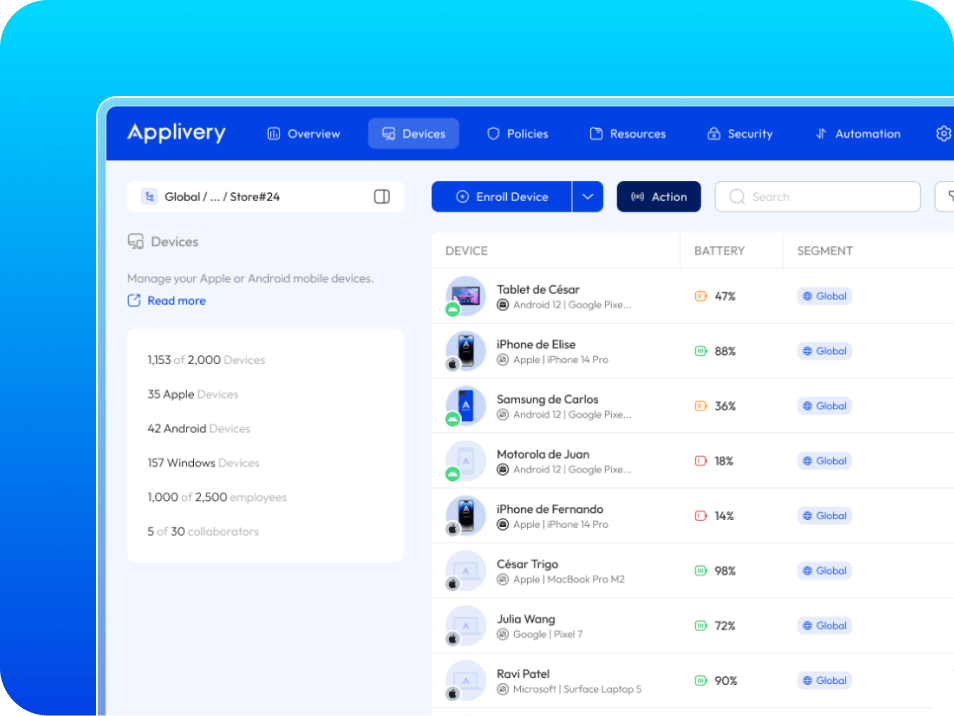
Remote control lets you act on any device at any time without physical access.
| Category | Action | Outcome |
|---|---|---|
|
Security |
Remote lock, factory reset, enterprise wipe |
Data protection |
|
Acces |
Passcode removal |
Immediate recovery |
|
Software |
App and profile install / removal |
Environment control |
|
Audit |
Device status (OS, battery, encryption, attestation) |
Full visibility |
All actions run in real time from the console.
How Zero-Touch deployment works
Zero-touch deployment lets you configure the device before the user ever turns it on.
With Applivery, all policies are applied during enrollment, eliminating manual configuration and reducing operational errors. The user receives a device that’s ready to work from the first moment.
The result: no manual setup, no user errors, no support tickets after delivery.
Why Applivery is the right foundation for scaling Apple Vision Pro across the enterprise
As your device fleet grows, manual processes stop being sustainable. The platform lets you define policies and automations that replicate automatically across the entire fleet maintaining consistency without adding to IT’s operational load.
How to integrate visionOS into IT operations without friction
The Apple Vision Pro brings new capabilities, but also new operational demands. With a UEM approach like Applivery, the device integrates into your corporate infrastructure with full control, security and automation from day one.
Want to see how this fits your environment?
We’ll show you how to integrate visionOS devices into your existing infrastructure, policies and processes, no generic demos.
Frequently Asked Questions ( (FAQ)
What can be managed on Apple Vision Pro with an MDM?
Applivery enables centralised management of connectivity, identity, security, certificates and remote device control.
This includes enterprise Wi-Fi configuration, VPN (including per-app and always-on), corporate accounts, Single Sign-On (SSO), security policies, certificate installation and remote actions such as lock, wipe and device status audit.
ation of corporate accounts (Exchange, Google Workspace, LDAP, CalDAV, CardDAV), Single Sign-On with Microsoft Entra ID, Okta and Kerberos, certificate management via SCEP and PKCS#12, passcode policies and hardware restrictions, Managed Device Attestation via Secure Enclave (M2), and real-time remote commands: lock, full wipe, enterprise wipe and device status audit.
Is Apple Vision Pro managed the same way as an iPhone or iPad in Applivery?
Yes. The enrollment flow and configuration payloads are equivalent to the rest of the Apple fleet, same dashboard, same console.
The differences lie in the visionOS-specific payloads, which Applivery supports natively. For configurations specific to certain visionOS features, refer to Applivery's technical documentation for this OS.
What security policies can be applied to visionOS devices?
Passcode policies, app and hardware restrictions, update management and network access control can all be enforced.
Additionally, visionOS supports device integrity verification through attestation, ensuring the hardware is legitimate before granting access to corporate resources.
What remote actions can be executed on an Apple Vision Pro?
From the Applivery console you can execute remote lock, full device wipe, enterprise data wipe, passcode removal and device status audit.
All actions run in real time and require no physical access to the device.