

Every IT team managing a distributed device fleet deals with the same invisible drain: routine requests that have nothing to do with security or infrastructure. A new app needs installing. A company link has changed. An employee wants to know if their device is compliant. The default answer is always the same, open a ticket and wait.
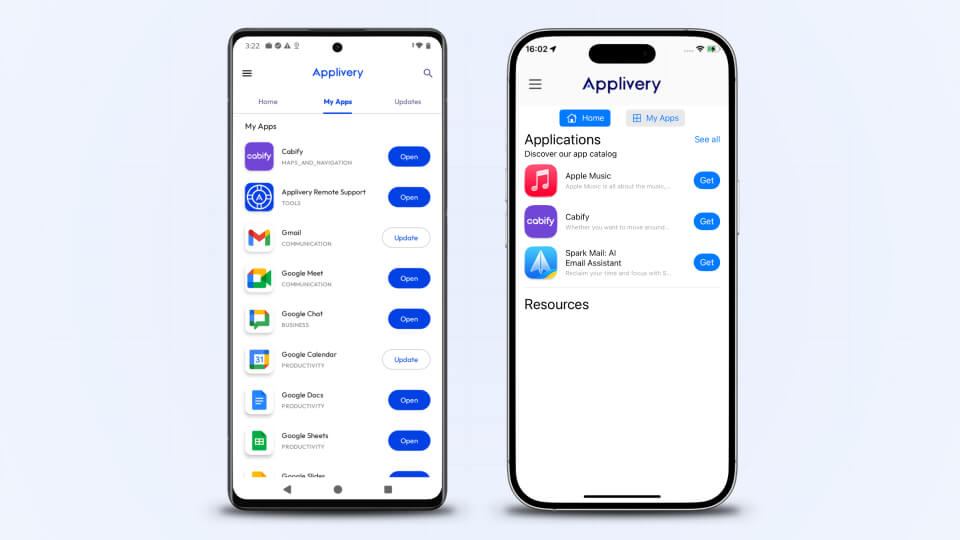
Applivery MDM Agent v2.0 closes that gap with a self-service portal for Android and iOS. A private corporate app store, a managed resource hub, and a live device status dashboard, all in the hands of employees, all controlled by IT.
Why IT teams need a self-service layer in their MDM
The traditional MDM model is built around IT pushing things to devices: apps, policies, configurations. That model works well for enforcement and security. It works poorly for day-to-day operations, where most interactions are not about policy, they are about access.
Field workers need the right app before a shift starts. Remote employees need a link to the HR portal. A distributed team needs to know whether their device tracking is working before a meeting. None of these situations require IT judgment. All of them end up as tickets anyway.
A self-service layer does not reduce IT control. It removes IT from the critical path for decisions that do not require IT involvement.
unlimited trial of Applivery
Capabilities of the Self Service Portal
The portal is a modular environment where every section can be independently toggled and configured through the Applivery Dashboard.
The on-demand application catalog
The core of the portal is a dedicated store that simplifies how users interact with corporate software.
Unified app catalog
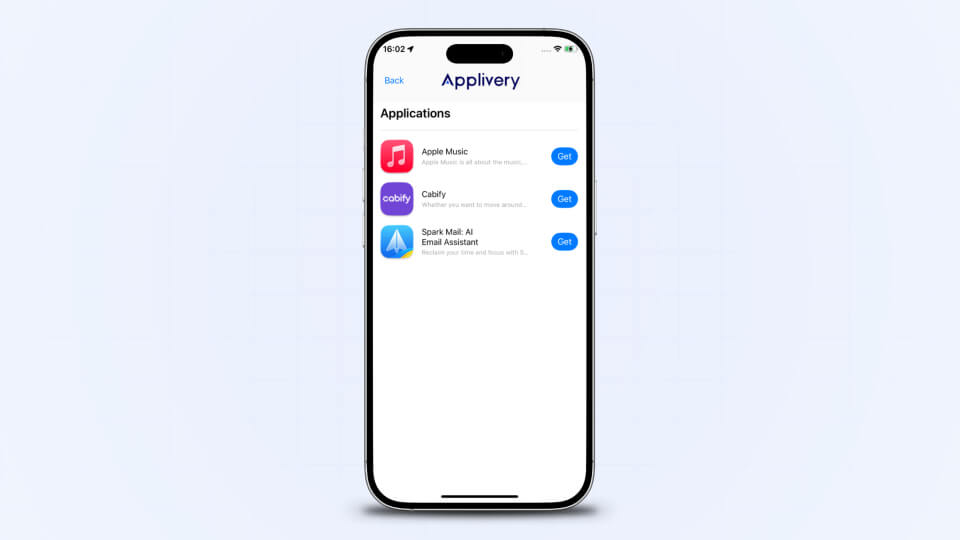
The portal consolidates every app source your organization relies on into a single, browsable interface. Users can access private apps hosted on Applivery, public apps from Google Play and the Apple App Store, and Google Play Private Channel apps, all in one place, without switching contexts or knowing where each app lives.
This is the natural convergence of App Distribution and Device Management: instead of managing two separate workflows, IT defines what users can access, and the portal handles the rest. For organizations still juggling separate distribution tools alongside their MDM, this unification is one of the core promises of Autonomous Endpoint Management.
Real-time status
Every app in the catalog shows its current state in real time (Installed, Update Available, or Incompatible) based on the device’s specific configuration and assigned policy. This gives users an accurate, always-current picture of their software environment and reduces the risk of employees unknowingly running outdated versions with the security vulnerabilities and operational inconsistencies that come with them.
Updates and patch management
App updates are one of the most persistent compliance headaches in enterprise device management. Outdated applications are a direct attack surface: unpatched vulnerabilities, deprecated security certificates, and broken integrations accumulate silently across the fleet until something goes wrong.
The Updates tab surfaces all managed applications with a pending version available, giving users direct visibility into what needs attention and letting them act immediately, without waiting for IT to schedule a forced remote push that might interrupt a critical workflow.
For IT teams, this matters beyond convenience. Patch compliance rates improve when users can act on their own schedule rather than having updates forced at inconvenient times. The fleet stays current, security exposure shrinks, and the IT team is not the bottleneck.
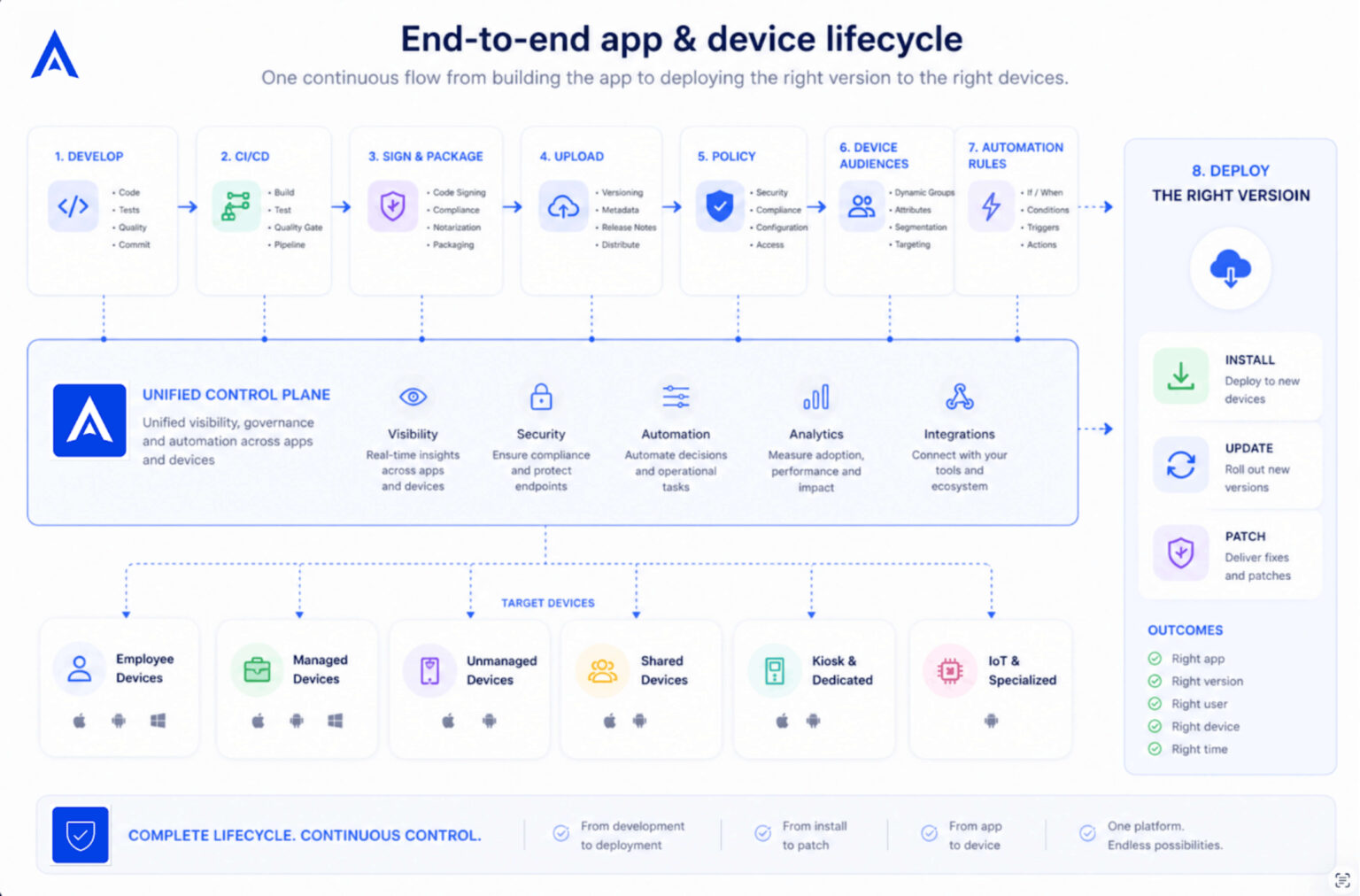
The complete lifecycle of an application and the device it runs on is no longer a fragmented process. From development and CI/CD pipelines to signing, build delivery, policy definition, device audiences, and version rollout, every step can be connected into a single operational flow. This makes it possible to control how each version is installed, updated, or patched based on device context, user group, platform, or business rules, turning app and device management into a continuous, automated, and governed process.
Managed bookmarks and resources
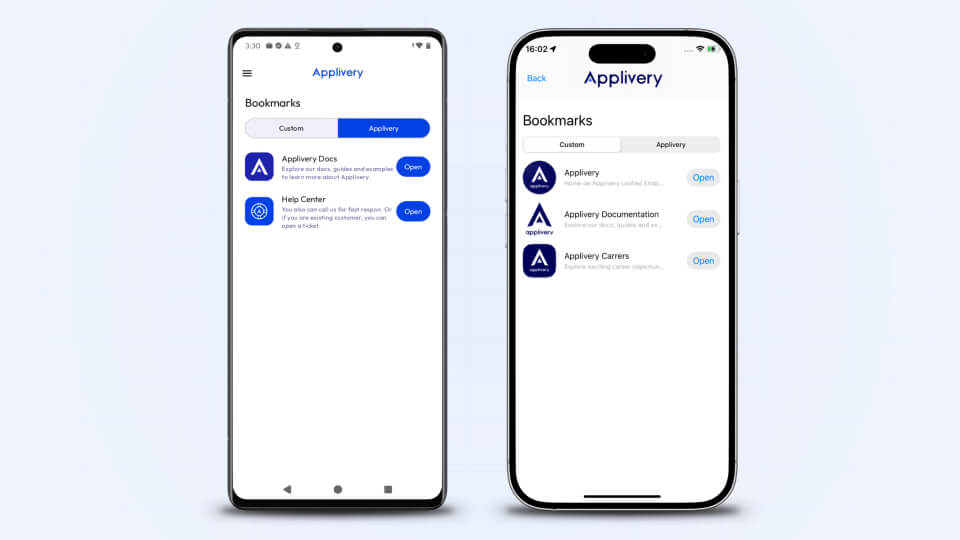
Internal URLs, HR portals, documentation, and technical guides tend to live in Slack threads, email chains, and wikis that go stale faster than they get updated. The result is a steady stream of “where do I find X?” messages that consume time on both ends.
The Bookmarks section replaces that with a curated, always-current resource hub synchronized directly from the Applivery Dashboard. Links are organized by category and updated instantly when an admin makes a change, no user action, no republishing, no version conflicts.
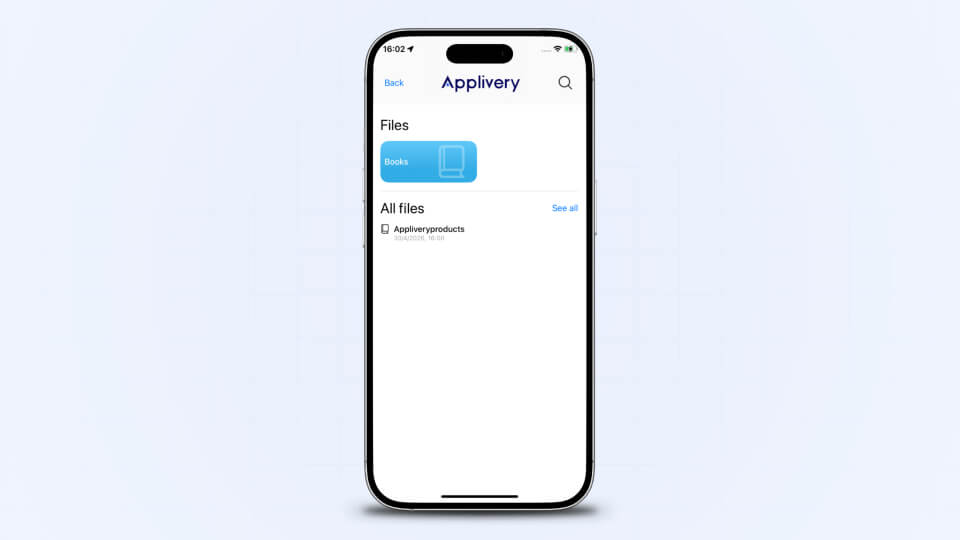
Resources work alongside bookmarks to cover the files your team actually needs on their devices. In Applivery, resources are images, certificates, and PDFs. Files that need to be available locally, not just linked. Whether it’s a security certificate, a company policy document, or a configuration file, resources are distributed and kept current from the same Dashboard, without requiring end users to download or manage anything manually.
Device intelligence and Digital Employee Experience (DEX)
Modern endpoint management is not just about keeping devices under control, it is about understanding how they are actually being used. The Applivery MDM Agent runs silently in the background, continuously collecting device telemetry and turning raw data into actionable intelligence for IT teams.
This persistent layer of visibility is what enables Digital Employee Experience (DEX): the ability to manage a device fleet with enough context to optimize both operational efficiency and the day-to-day experience of the people using those devices.
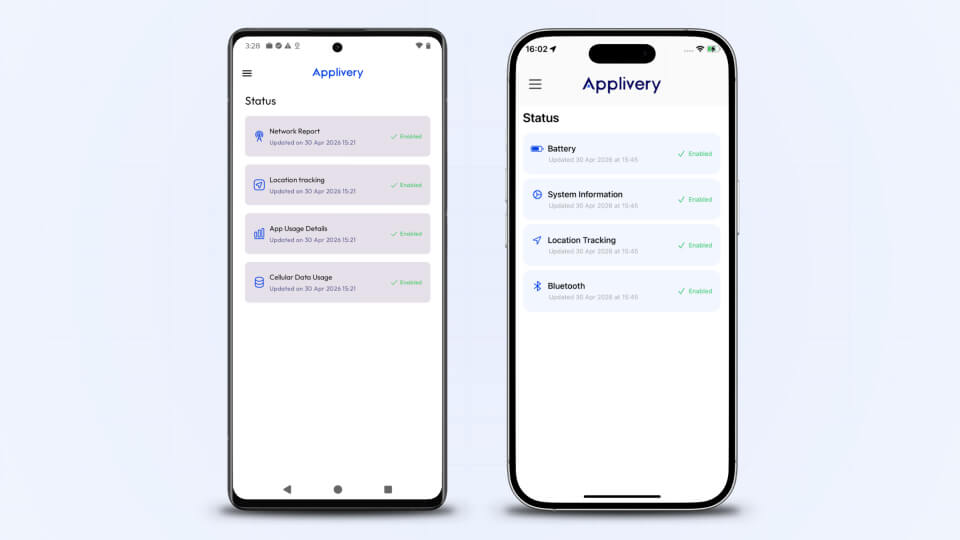
The Status Dashboard simply surfaces what the agent is already capturing , giving users a transparent view of what is being reported from their device, without requiring any action on their part.
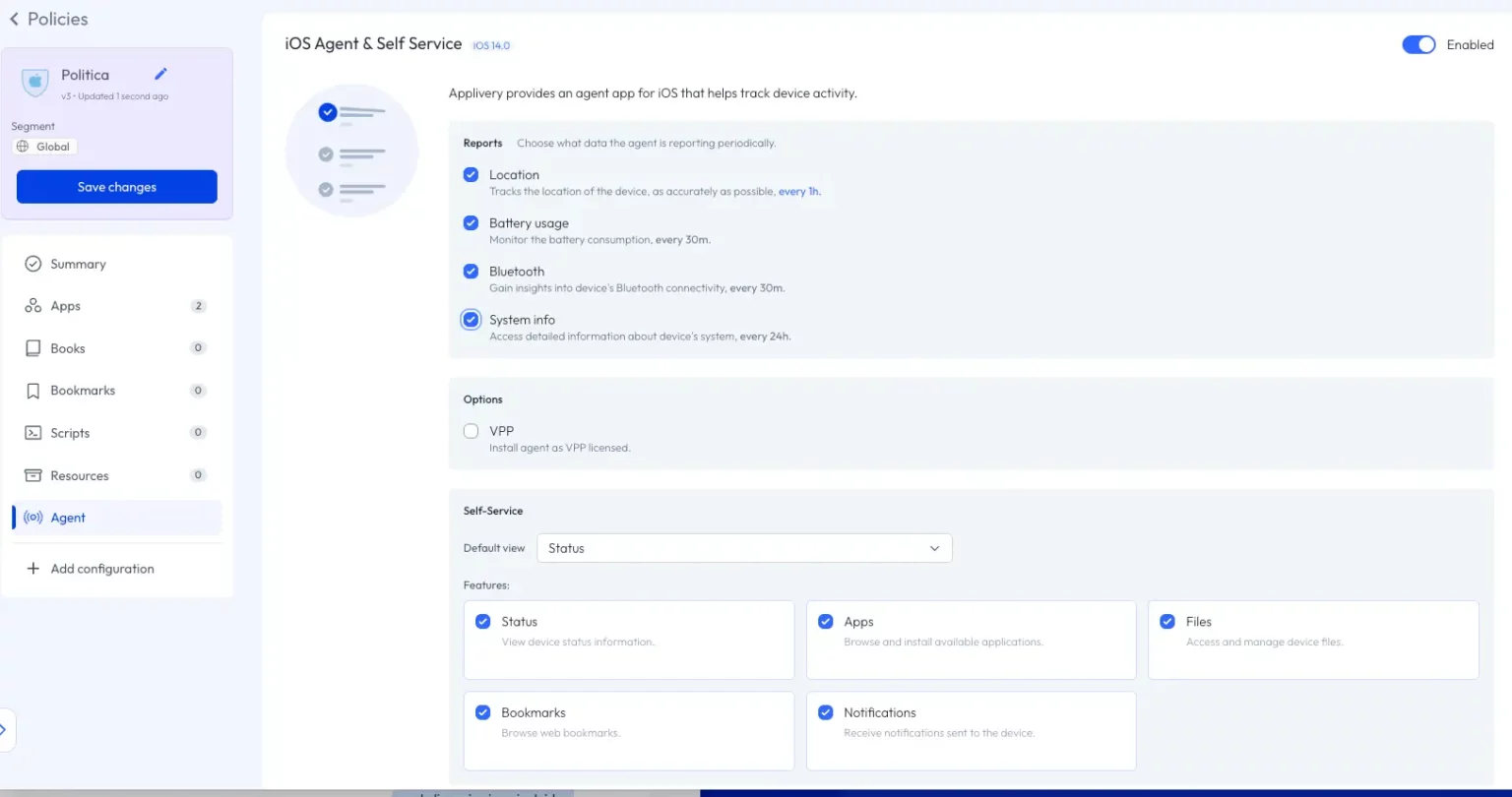
The agent itself can be deployed in layers. IT administrators can enable it component by component (telemetry only, bookmarks, app catalog, status visibility) or keep it running purely as a background management agent without exposing any self-service interface to users at all. Every capability is opt-in, which means organizations can roll out gradually, validate each layer, and maintain full control over what employees see and interact with.
App usage insights
The agent tracks foreground app usage time across the entire fleet, broken down by application and aggregated weekly. IT managers can see exactly which apps employees spend their time in and, critically, which ones they do not. This has direct implications for software license optimization, productivity analysis, and identifying tools that are not delivering value.
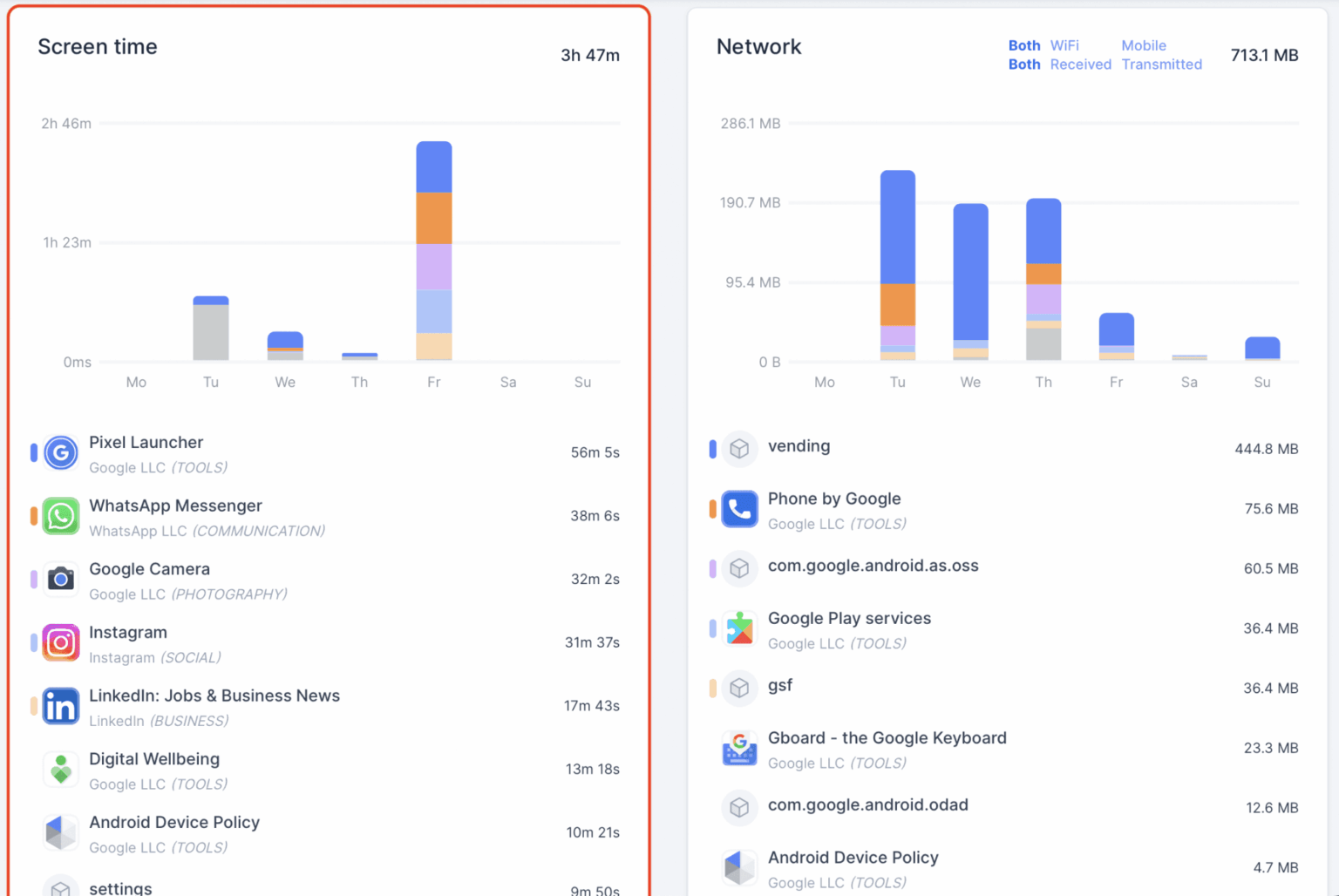
This visibility extends to AI-powered applications. Without any additional configuration, IT can see which AI tools are installed across the fleet, how much time employees are spending in them, and what volume of network traffic (both inbound and outbound) each one is generating. At a time when shadow AI adoption is outpacing governance frameworks in most organizations, that data is not a nice-to-have. It is a baseline requirement for any IT team serious about data security and compliance.
Network traffic intelligence
The agent reports per-app network consumption in real time, distinguishing between incoming and outgoing traffic and breaking it down by connection type: Wi-Fi, 3G, 4G, and 5G. This level of granularity goes well beyond knowing that a device used data. It tells you which application generated that traffic, in which direction, and over which network.
Each report is enriched with additional context: the device’s geographic location at the time of the report, the carrier and signal strength, and whether the device was operating on a home or roaming connection.
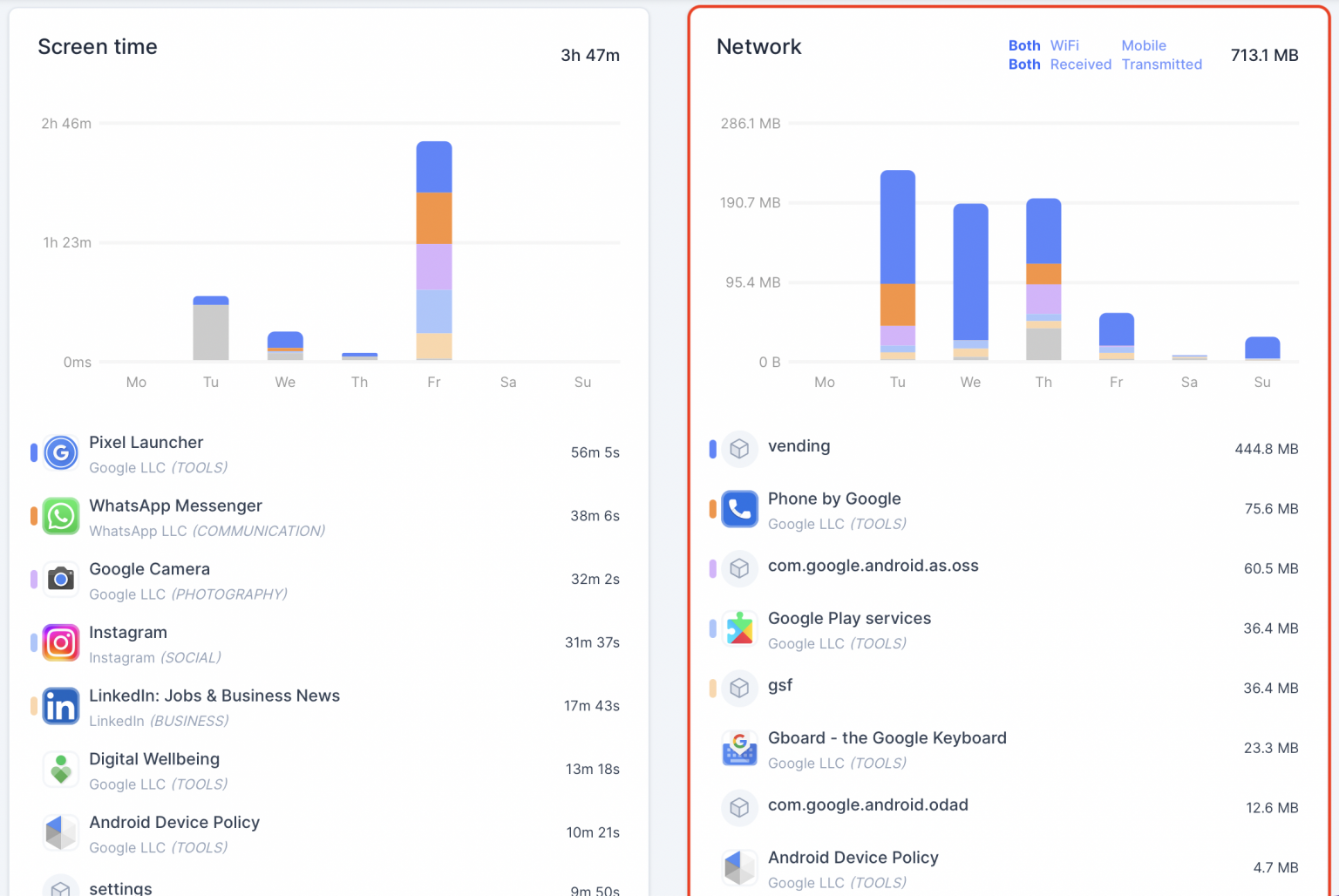
For organizations managing distributed fleets across regions or countries, this means network consumption data is not just a usage figure, it is a contextualized signal that can surface carrier inefficiencies, identify roaming cost exposure before it becomes a billing problem, and flag anomalous traffic patterns tied to a specific location or network condition.
For IT, this translates into three concrete use cases:
Detecting abnormal data consumption patterns that may indicate a security incident.
Identifying apps generating unexpected outbound traffic,
Managing mobile data costs across large fleets where uncontrolled consumption directly impacts the bottom line.
Location tracking and operational awareness
The agent continuously reports each device’s geographic location, including full street address where available. For IT teams managing distributed fleets this provides a real-time operational picture that goes beyond compliance.
Location data also opens the door to context-aware management. Knowing where a device is or where it has been, makes it possible to correlate location with app usage, network behavior, and policy compliance, and to trigger configuration or deployment actions based on that context.
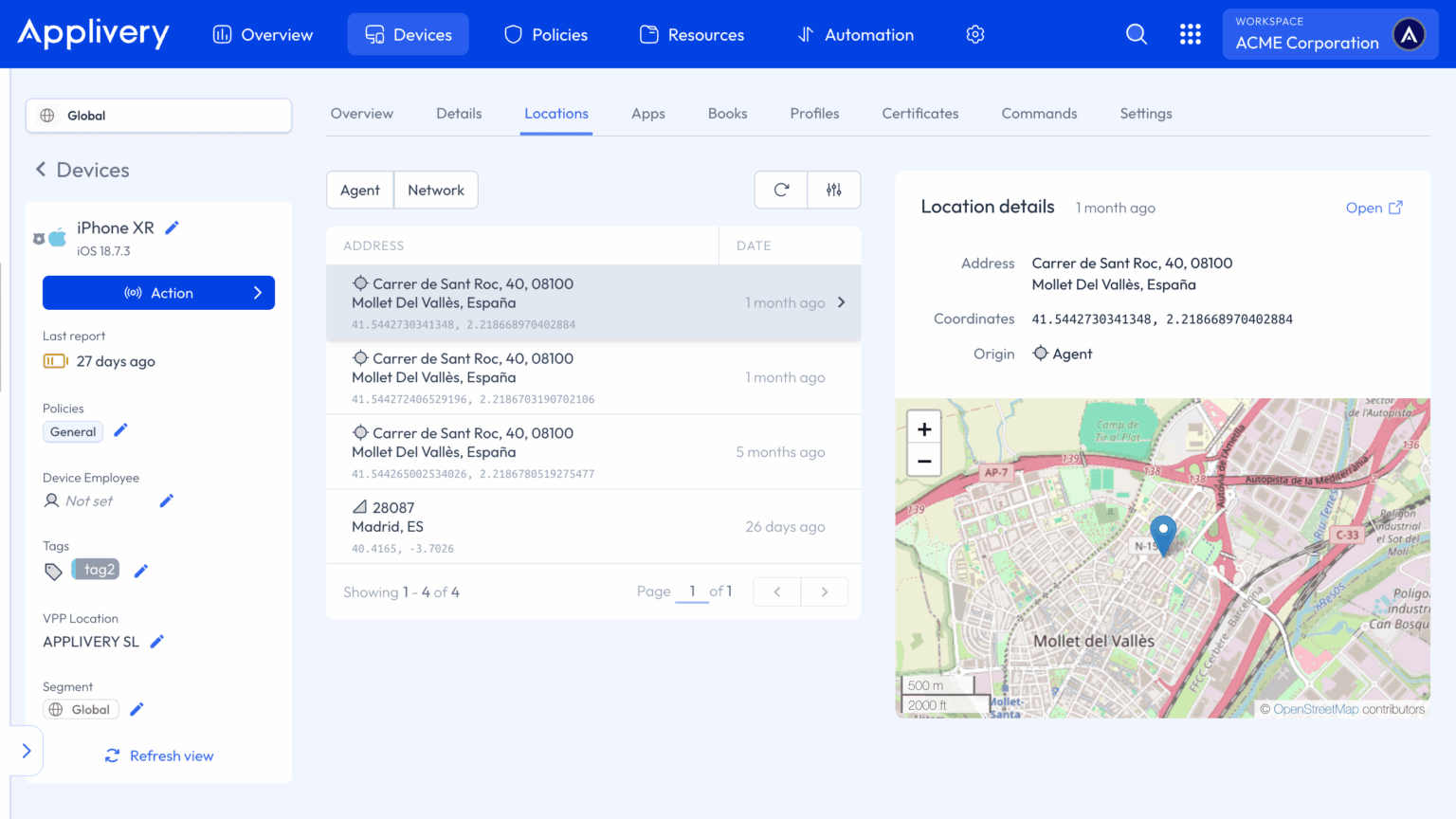
The specific implementation will vary depending on how each organization structures its management workflows, but the data is there, continuous and precise, ready to feed whatever operational logic the IT team needs to build around it.
IT stays in full control
Giving employees more visibility does not mean giving up administrative control. Every section of the portal, Applications, Bookmarks, Status, Files, and Notifications, can be independently enabled or disabled per device or device group through Managed Configuration. Sections that are not enabled are completely invisible to employees.
Administrators can set a default view, restrict what each group sees, and push configuration changes silently from the Applivery Dashboard. The background MDM agent continues running exactly as before: policy enforcement, geolocation reporting, and compliance monitoring are unaffected. The portal is additive, it gives employees a window into the system without modifying how the system works.
Rollouts can be gradual. Enable the portal for one team, validate the experience, then expand to the rest of the fleet.
Enable it today
The Applivery Self-Service Portal is available now as part of MDM Agent v2.0. Enable it from your Applivery Dashboard under the Agent section of any Policy. No additional infrastructure or setup required beyond your existing managed configuration.
Each platform has its own setup requirements and specific behavior. Refer to the documentation for the full configuration guide for your environment:
Ready to deploy?
The Self-Service Portal is available now. You can enable it today from your Applivery Dashboard under the Agent section of any policy.
Frequently Asked Questions (FAQ)
What is the Applivery Self-Service Portal?
The Self-Service Portal is the user-facing interface of the Applivery MDM Agent v2.0, available for Android and iOS. It gives employees a private corporate hub where they can install and update authorized apps, access company bookmarks and resources, and monitor their device's management status, all without raising a support ticket. For IT teams, it means fewer routine requests, faster app adoption, and a better Digital Employee Experience across the entire managed fleet.
Which operating systems are compatible with the new Portal?
The Self-Service Portal is available for:
- Android: version 7.0 or higher, supporting Fully Managed, Work Profile, and COPE (Company-Owned, Personally Enabled) modes.
- iOS: version 16.0 or higher, supporting both supervised and unsupervised enrollment modes.
Does the Self-Service Portal replace the background MDM Agent?
No. The Portal is an additional interaction layer built on top of the Applivery MDM Agent v2.0, it doesn't replace any existing functionality.
Background services continue running in parallel: geolocation tracking, app usage reporting, network traffic monitoring, and policy enforcement all operate seamlessly while the user interacts with the Portal. What the user sees in the Portal is a real-time reflection of what the agent is already collecting and enforcing in the background.
Can I customize which sections are visible to my users?
Yes. Administrators have full granular control through Managed Configurations in the Applivery Dashboard.
You can independently enable or disable five sections: Applications, Bookmarks, Status, Files, and Notifications, per device group or policy. You can also configure which section opens by default when a user launches the agent, allowing you to tailor the experience based on the device's role within the organization.
How does the "Updates" tab help with compliance?
The Updates tab gives users direct visibility into which of their managed applications have a newer version available, and lets them trigger the update at their convenience. For IT, this removes the need to force remote pushes that might interrupt critical workflows, while keeping patch compliance rates high across the fleet.
Combined with Applivery's app distribution pipeline, where new versions can be pushed from your build system directly to a policy, the Updates tab becomes the last mile of an automated patch management process: the version lands in Applivery, the policy propagates it, and the user applies it on their own schedule.
Is my data secure within the Portal?
Security is built into every layer of the agent. All tracking reports are encrypted at runtime using SHA-256. Data in transit between the agent and Applivery servers is protected with SSL TLS 1.3, and data at rest on our servers is encrypted using SHA-256.
As a European-based provider, Applivery operates under strict GDPR compliance standards, so the telemetry your fleet generates stays protected and within the boundaries of applicable data protection regulation.