

During the first five months of 2026, several organizations in Mexico’s financial system reported eight cybersecurity incidents to the Bank of Mexico or the National Banking and Securities Commission.
The incidents included ransomware attacks, breaches affecting money transfer services, the compromise of a third-party application, and the extraction of banking information held by a vendor. In the report’s latest update, published on July 22, the full impact of several incidents had yet to be determined.
For IT and cybersecurity leaders, the value of this information goes beyond understanding what happened in the financial sector. It raises a question that every organization should be able to answer:mpresa debería poder responder:
Can you identify and control every device employees, vendors, and contractors use to access your applications and data?
An organization may protect its servers, strengthen authentication, and monitor its network while still leaving blind spots across the computers, smartphones, and tablets that connect people to corporate resources.
What do cybersecurity incidents in Mexico reveal?
The eight reported incidents were not caused by a single type of threat. The report points to an attack surface that includes critical services, external applications, vendors, and multiple access points to corporate information.
| Reported incident | What happened | What IT should review |
| Ransomware | Two banks reported attacks involving LockBit and Qilin. One affected electronic channels and money transfers. | Updates, encryption, policy compliance, and the ability to take remote action on devices. |
| Money transfer service breach | Several organizations experienced incidents affecting the transfer services they provide to customers. | Devices with access to critical applications, network configurations, certificates, and assigned permissions. |
Compromised third-party application | One incident affected an external application used to provide money transfer services. | Authorized devices, vendor access requirements, managed applications, and credential revocation. |
| Information held by a third party | Banking information managed by a vendor was reportedly extracted. | Data stored outside the organization, devices used by third parties, and access revocation when the relationship ends. |
Two banks reported ransomware attacks involving LockBit and Qilin. In one case, electronic channels and money transfers were affected, and the organization reported an impact of MXN 91.76 million.
That figure does not necessarily represent stolen funds. The report explains that the impact may include expenses and investments associated with managing the incident, as well as any fraudulent amount recognized by the institution.
The cost of an attack does not end with the direct loss of money or information. It may also include investigations, system recovery, operational disruption, additional support, and the urgent implementation of new security measures.
Risk does not end with your own infrastructure
Two of the reported incidents are particularly relevant to any organization that depends on technology vendors. In one case, an application managed by a third party was compromised. In another, banking information held by a vendor was extracted.
Outsourcing an application, infrastructure, or service does not mean outsourcing the risk. The organization still needs to know:
- Who can access its information.
- Which device they use.
- Whether that device meets security requirements.
- Which corporate applications are installed.
- Which certificates or credentials are in use.
- How access will be revoked when it is no longer required.
The attack surface no longer ends at the office or the corporate network. It also includes every computer, smartphone, or tablet employees, vendors, and contractors use to access email, connect to a VPN, open corporate applications, or view company information.

The problem is not having devices. It is being unable to control them
Devices are involved in almost every business process. They provide access to collaboration tools, cloud services, private networks, internal applications, and platforms managed by third parties.
Risk increases when IT cannot quickly answer basic questions:
- How many devices currently access company systems?
- Who uses each device?
- Which operating system version is installed?
- Which devices are encrypted?
- Which corporate applications do they contain?
- Which devices no longer comply with security policies?
- Which devices are used by vendors or former employees?
- Can access be revoked without having the device physically available?
When these answers depend on spreadsheets, emails sent to users, or manual reviews, the organization loses its ability to prevent risks and respond quickly to an incident.
Seven controls for protecting corporate devices
The following table summarizes the controls IT and cybersecurity teams should review.
| Control | The question IT must answer | How a UEM platform helps |
| Centralized inventory | Do we know which devices access company systems? | Brings device, user, operating system, and version data into a single console. |
| Security requirements | Do all devices meet minimum security standards? | Enforces encryption, password, screen lock, and approved operating system version policies. |
| Updates | Can we identify and remediate outdated devices? | Provides visibility into versions and enables remote deployment of applications and configurations. |
| Application control | Do we know which corporate applications are installed? | Centrally distributes, configures, updates, and removes applications. |
| Wi-Fi, VPN, and certificates | Can we grant and revoke access without manual processes? | Deploys and removes profiles, certificates, and network configurations on managed devices. |
| Policy compliance | Can we detect when a device no longer meets security requirements? | Identifies outdated or misconfigured devices and allows IT to apply predefined actions. |
| Remote response | Can we act without having the device physically available? | Enables IT to lock devices, erase data, and remove corporate applications or configurations remotely. |
1. Maintain an up-to-date device inventory
You cannot protect what you cannot see. IT needs a centralized view of every computer, smartphone, and tablet that can access corporate information. The inventory should show the assigned user, operating system, installed version, available applications, and security status.
It must also update automatically. A spreadsheet created three months ago may not include newly enrolled devices, user changes, retired equipment, or access that should already have been revoked.
A UEM platform such as Applivery provides this information from a single console, even when devices are distributed across multiple offices, cities, or countries.
2. Define minimum security requirements
Knowing a password should not be the only requirement for accessing company applications.
Organizations can define minimum device conditions, including:
- Active encryption.
- A PIN, password, or screen lock.
- A minimum operating system version.
- A maximum automatic lock period.
- Restrictions on specific features.
- Protection against unauthorized modifications.
The important thing is to define the rules, enforce them consistently, and avoid relying on every user to configure their device correctly.
The important thing is to define the rules, enforce them consistently, and avoid relying on every user to configure their device correctly.
3. Keep operating systems and applications up to date
Releasing an update does not mean every device has installed it.When updates depend on the user, IT loses visibility into the versions still in use and how long updates have been pending. This becomes particularly important when an update addresses a known vulnerability.
Centralized management helps teams identify outdated devices, deploy new versions, and reduce the amount of time a device remains exposed. It also prevents support teams from having to contact each employee individually or travel to an office to complete a task that can be handled remotely.
4. Control corporate applications
Applications connect devices to company information. Managing hardware alone is therefore not enough.
IT needs to decide:
- Which applications are distributed.
- Which versions are allowed.
- Which configurations they receive.
- Which users or groups can access them.
- When an application must be updated.
- When it must be removed from a device.
A device management platform allows IT to distribute corporate applications and configure them without relying on users to complete every step manually. It also makes it easier to remove an application when a project ends, a vendor changes, or an employee leaves the organization.
5. Deploy certificates, Wi-Fi, and VPN configurations securely
Access to a corporate network or VPN should not depend on a document containing setup instructions sent by email. Manual setup leads to inconsistent configurations, increases the workload for support teams, and makes access harder to revoke when circumstances change.
With a UEM platform, IT can deploy Wi-Fi networks, certificates, and VPN configurations directly to authorized devices. These configurations can also be updated or removed without user intervention. This is especially useful for remote teams, distributed offices, and vendors that need temporary access to internal resources.
6. Detect devices that do not comply with security policies
Creating a policy is only the first step. Real control means knowing when a device stops complying with it. A device may be correctly configured today and fall outside the organization’s security requirements tomorrow because of a pending update, a user-made change, or the installation of an unauthorized application.
IT teams must be able to identify these deviations and determine the appropriate response:
- Notify the user.
- Reapply a configuration.
- Restrict specific features.
- Escalate the issue to the cybersecurity team.
Continuous visibility reduces the time between the emergence of a risk and the organization’s response.
7. Respond remotely
When a computer or smartphone is lost, stolen, or begins behaving suspiciously, waiting to recover it physically may not be an option.
IT needs the ability to take remote action:
- Lock the device.
- Erase its data.
- Remove corporate applications.
- Delete profiles and certificates.
- Revoke access.
- Reapply security policies.
- Review the latest available device information.
These actions do not replace an incident response plan, but they help reduce the time during which a device continues to represent a risk.
How to control devices used by vendors
The incidents reported in Mexico show that an application or vendor can also become part of a cybersecurity incident.
Third-party risk management should therefore go beyond contractual clauses or annual security questionnaires. It must also consider the security posture of the devices used to access corporate information.
Before granting access, the organization should define:
- Which devices may be used.
- Which security requirements they must meet.
- Which applications they may access.
- How long access is required.
- Which information may be stored locally.
- How applications, certificates, and permissions will be removed.
When the relationship with a vendor ends, the organization should not rely solely on that vendor to remove each configuration manually. IT needs to revoke access, uninstall corporate applications, and remove certificates in a controlled way.
How does UEM support cybersecurity?
A UEM platform cannot prevent every cyberattack on its own. It also does not replace endpoint protection, identity and access management, SIEM, network security, backups, or incident response.
Its role is to secure a specific part of the attack surface: the devices employees, vendors, and contractors use to access company resources.
With Applivery, IT and cybersecurity teams can:
- Maintain a centralized inventory.
- Apply policies based on the user or device type.
- Distribute and update applications.
- Configure networks, certificates, and VPNs.
- Detect devices that do not comply with security policies.
- Automate actions across groups of devices.
- Lock devices or erase their data remotely.
- Remove configurations when access is no longer required.
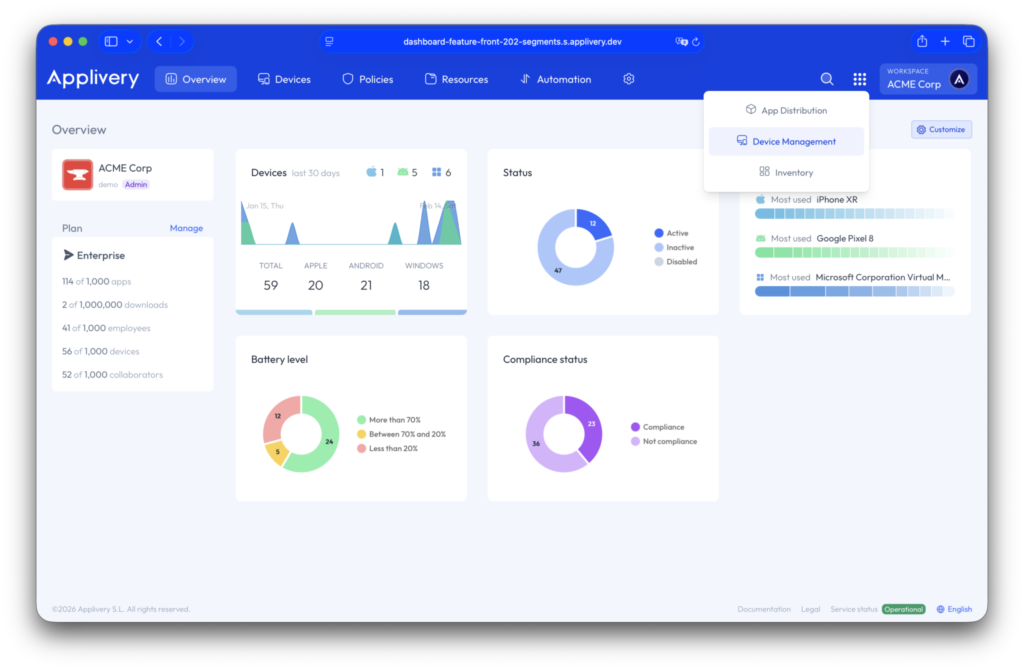
The result is not simply greater visibility. It also means less reliance on manual processes and a faster response when an incident occurs.
Does your organization have real control over its devices?
Before evaluating a solution, consider the following questions:
- Can you identify every device that accesses your applications?
- Do you know which devices are outdated or fail to meet security policies?
- Can you apply a configuration across your entire device fleet?
- Can you deploy and remove applications without physically accessing the device?
- Do you know which devices your vendors use?
- Can you immediately revoke certificates and access?
- Can you lock a device or erase its data remotely?
When any of these tasks depends on manual processes, instructions sent by email, or cooperation from the user, there is an area of exposure that should be reviewed.
The cybersecurity incidents recorded in Mexico leave organizations with a clear conclusion: the more distributed their operations become, the more important it is to know which devices access corporate information and to act on them without delay.
Try Applivery and see how much control you currently have over your corporate devices.