
For a system administrator, a Policy is much more than a collection of settings; it is the declarative blueprint that defines the operational and security state of every device. Its function is to act as a bridge between technical configuration and real-world compliance, allowing the platform to orchestrate software, restrictions, and scripts automatically.
At Applivery, we understand that fragmentation is your greatest enemy. By integrating our solution into your workflow, you stop managing computers individually and move to a UEM (Unified Endpoint Management) model that ensures the consistency of your Windows, Apple, and Android infrastructure from a single, intuitive console.
App Management: the pillar of secure productivity
Software administration is critical to ensuring that devices run only approved applications, mitigating security risks, and guaranteeing productivity.
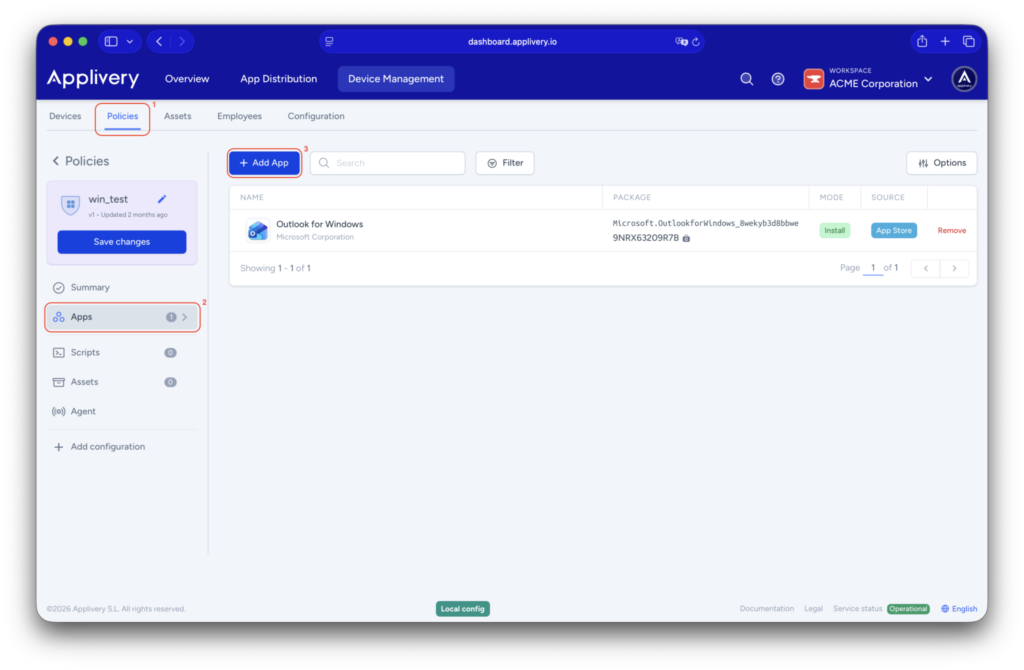
From the Applivery Dashboard, you can deploy applications from three strategic sources:
- Microsoft Store: the recommended option for modern apps; it guarantees native integration and automatic updates.
- Resources (.msi, .msix, .appx): ideal for internal corporate tools or third-party software not available in public stores. Additionally, these applications can also be managed and deployed directly through App Distribution if your organization has this module active, providing a seamless bridge between your development pipeline and device management.
- App Catalog: a managed repository that allows users to install what they need on demand, reducing administrative overhead.
You can configure apps as “Force installed” to ensure mandatory deployment, or as “Available” for on-demand installation via the self-service portal.
Windows MDM agent: extending policy control
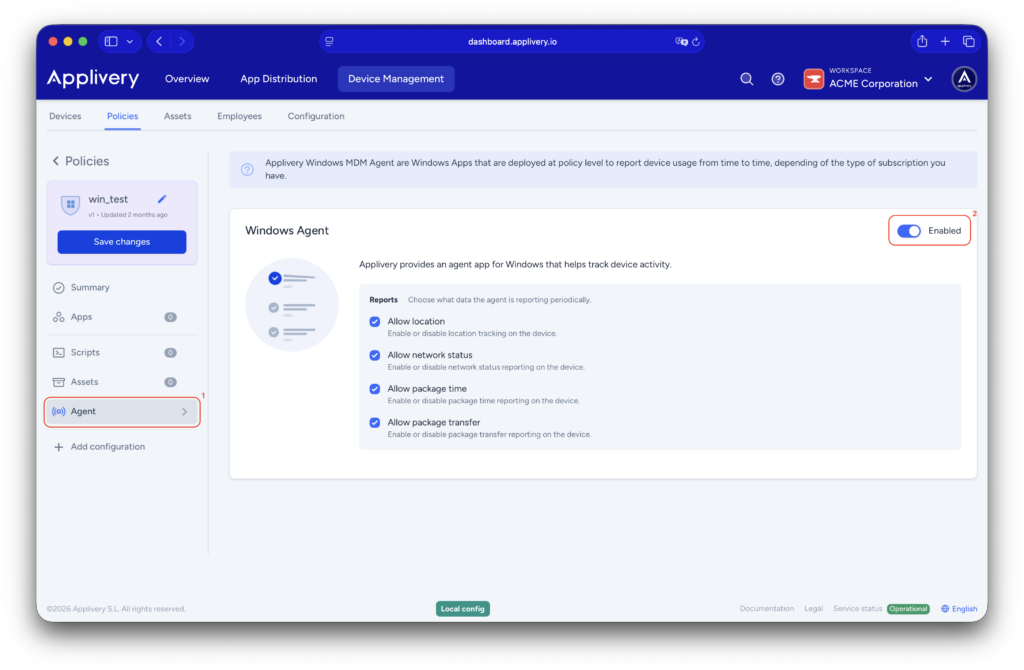
While Windows offers native APIs, certain advanced configurations require deeper control. The Applivery Windows MDM Agent is the bridge that allows IT teams to implement advanced workflows and gain deep endpoint visibility that is not available through the standard Microsoft framework.
Self-Service: autonomy under your rules
Activating the Agent within a policy allows you to deploy a Self-Service environment, which drastically reduces support tickets by empowering the user:
- App Catalog: employees can install pre-approved resources independently.
- Autonomous Actions: allows users to execute predefined scripts to resolve common issues without IT intervention.
Configuration is handled directly in the Agent section of your chosen policy.
Automation through scripts in your policy
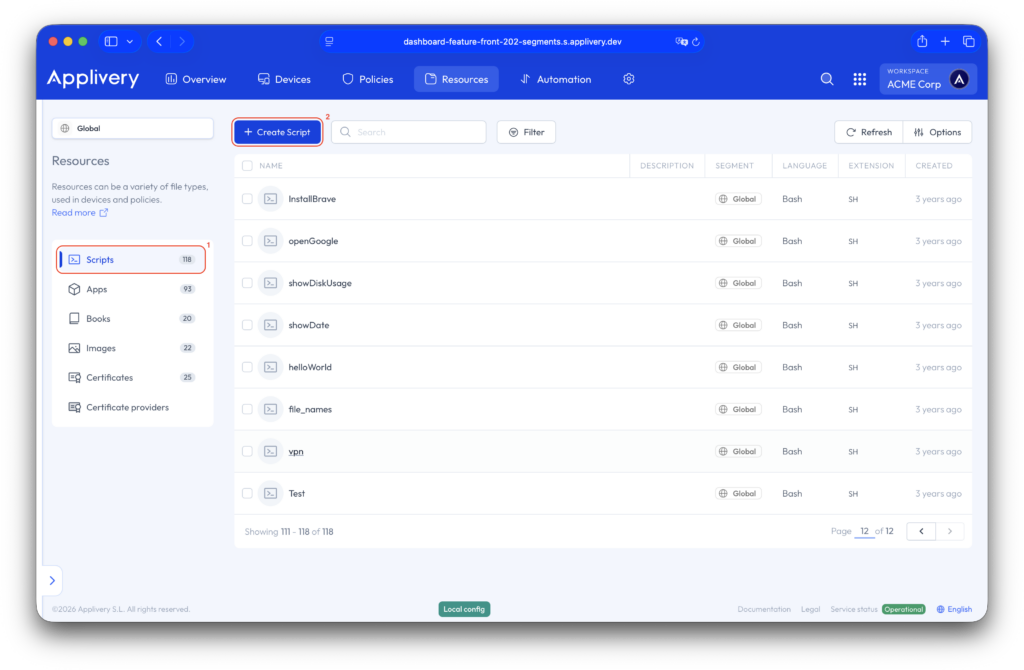
Scripts are the ultimate tool for scaling repetitive tasks. In Applivery, scripts are not isolated commands; they are assets integrated into your policies to gain speed, precision, and simplicity.
Intelligent Orchestration and Deployment
- AI-Assisted Creation: you can write PowerShell scripts in the Dashboard, upload them from a file, or use our AI Assistant to generate functional code from a simple description. Please note that the AI Assistant is a premium feature and may not be included in all plans.
- Flexible Assignment: assign scripts to a specific device for troubleshooting or to an entire Policy to ensure every new machine is configured automatically.
- Execution Methods: choose whether a script runs once, in a loop for constant monitoring, or on-demand through the user’s Self-Service portal.
Public Script Repository
To further accelerate your operations, we offer a Public Script Repository with community-validated solutions.
This allows you to:
- Standardize Solutions: use ready-made configurations for system cleanup or network adjustments without writing code from scratch.
- Increase Efficiency: leverage accumulated technical expertise to reduce implementation times.
Total Control in One Place
By combining robust app management, the power of the Windows Agent, and the agility of scripts, you transform your IT department. You move from “fixing problems” to designing an ecosystem that self-manages and natively complies with international standards such as ISO 27001, GDPR, and ENS.
Applivery gives you back control of your infrastructure, reducing operational costs and the TCO of your Windows fleet from a single centralized console.
Ready to simplify your infrastructure?
Try Applivery for free today and start deploying your first policies in minutes.
Frequently Asked Questions (FAQ)
What is the difference between a "Force Installed" and "Available" app?
A "Force Installed" app is automatically deployed to the device without user interaction to ensure compliance. An "Available" app appears in the Self-Service catalog, allowing the user to choose when to install it.
Is the Windows MDM Agent mandatory?
No, it is an optional component. However, it is highly recommended if you need to execute PowerShell scripts, provide a Self-Service app catalog, or go beyond the native limitations of the Windows MDM protocol.
Can I automate the deployment of internal (.msi) applications?
Yes. You can upload your .msi files to the "Resources" section and assign them to a policy for automatic distribution to your Windows fleet.
Does Applivery support "Zero-Touch" for Windows?
Yes, Applivery integrates with Windows Autopilot, enabling out-of-the-box enrollment where devices are automatically configured upon the first user login.
How secure are the scripts executed through Applivery?
All script executions are recorded in the device's command history for full auditability. Additionally, admins can restrict which scripts are available in the Self-Service portal to ensure users only run safe, approved operations.