

If you manage Macs in a regulated environment, you know that preparing a fleet for an ISO 27001 or ENS Cat. Alta audit takes longer than it should. Translating each technical control into concrete MDM policies, testing them on macOS, and iterating until the behavior is as expected are steps that eat up weeks before you have touched a single organizational control.
In Spain, there are 3,484 active ENS certifications. Only 779 reach Category High, barely 22% of the total. The most common reason organizations fall short is not the lack of controls: it is that when the auditor arrives, the endpoint is not properly configured and the evidence is not at hand.
Preparing a Mac fleet for an ISO 27001 or ENS audit is a lengthy process: reviewing each technical control, translating it into MDM configurations, testing policies, iterating. That is why we have added to our platform two predefined MDM templates for Apple macOS that apply in one click the controls both standards require on the endpoint, designed as a starting point for organizations beginning their certification process, and built from the experience Applivery used to certify its own environment to ENS Cat. Alta.
unlimited trial of Applivery
macOS security controls by compliance standard
Each template automatically applies the following policies to macOS devices:
| Technical control | ISO 27001:2022 | ENS Cat. Alta (RD 311/2022) |
|---|---|---|
|
FileVault forzado enforced with centralized key escrow, no option to disable |
A.8.24 – Cryptography |
mp.si.1 – Encryption |
|
Alphanumeric password of at least 8 characters, 2 complex characters, no simple passwords |
A.8.5 – Authentication |
op.acc.6 – Authentication |
|
Automatic updates for OS, applications and critical patches |
A.8.8 – Vulnerabilities |
op.exp.4 – Change management |
|
Managed firewall with UI locked for the user |
A.8.20 – Network |
op.net.1 – Perimeter |
|
Screen lock with password after 5 minutes of inactivity |
A.8.1 – Endpoint |
mp.eq.3 – Info protection |
|
App Store restricted to software updates only |
– |
op.exp.2 – Security configuration |
|
Block of apps from unidentified developers via Gatekeeper |
– |
mp.sw.1 – Application development |
Two templates, two standards
Template ISO 27001:2022 — macOS baseline
The ISO 27001 policy for macOS establishes the security baseline that Annex A of the standard requires on the endpoint: cryptography, authentication, vulnerability management, network and device protection.
It is designed for private organizations that are beginning their ISO 27001 certification process or need to demonstrate an auditable level of security across their Mac fleet.
Template ENS
The ENS Cat. Alta policy applies to macOS the technical controls that the auditor will review during the compliance process under Royal Decree 311/2022, the most demanding level of the Spanish cybersecurity framework.
In addition to the common baseline, it includes two controls that ENS Category High specifically requires:
- App Store restricted to software updates only, with no free app installation
- Block of applications from unidentified developers via Gatekeeper
It is particularly relevant for technology vendors that operate with the Spanish public sector, or aspire to do so, since ENS compliance is mandatory in that context.
How to apply these policies to your Mac fleet
You can apply these policies to your Mac fleet in four steps from your Applivery console.
- Log in to your Applivery console.
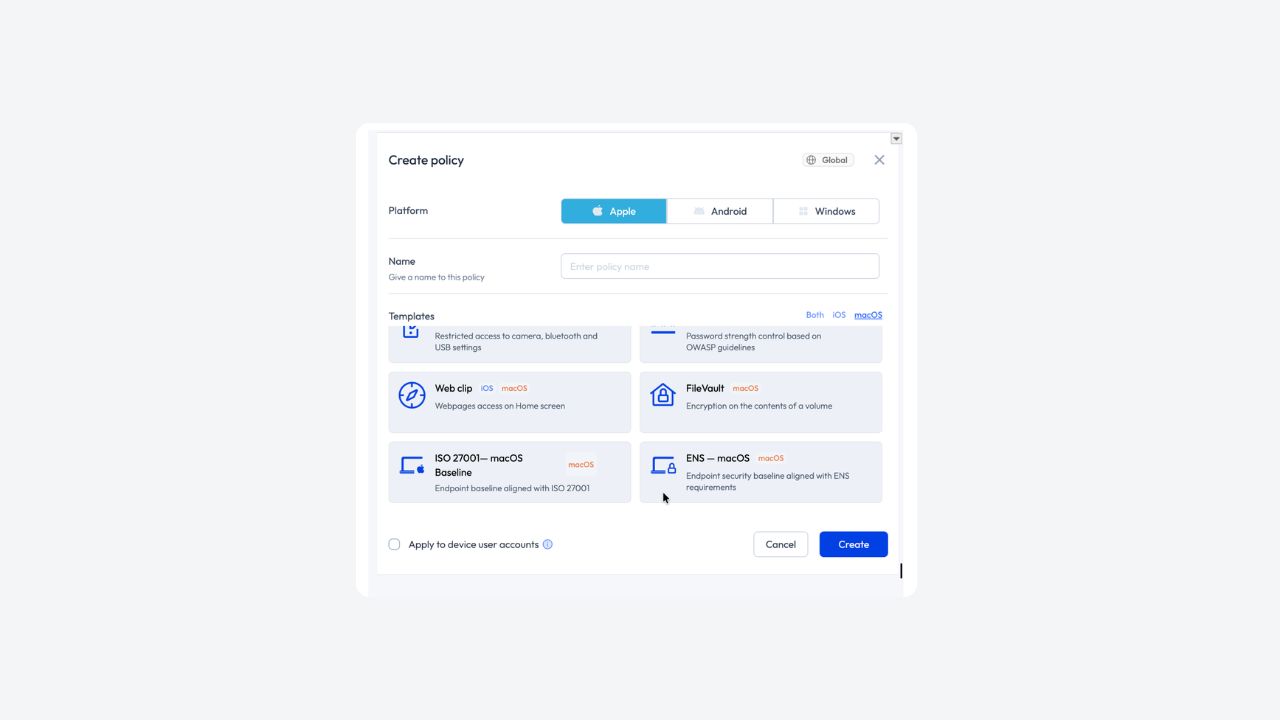
- Open the Policies section. If you want to apply the template to a specific segment, select it first in the Segments panel on the left. If you leave it on Global, the policy will apply to the entire workspace.
- Click the + Create Policy button.
- In the Create Policy modal, select Platform → Apple, enter an identifying name, and under Templates, click the macOS filter to locate the template and select ISO 27001 macOS Baseline or ENS macOS as applicable.
Why this matters in 2026
ISO 27001:2022 strengthened controls over end-user devices, particularly in the vulnerability management and endpoint protection domains.
The ENS, following its update under Royal Decree 311/2022, raises the requirements for encryption, authentication and traceability on macOS. Category High requires applying all 73 measures in Annex II without exception. Endpoint findings are one of the most common reasons audits are extended and, at Category High, one of the most heavily penalized.

These templates apply the technical controls the auditor reviews on the endpoint: active encryption with key escrow, robust alphanumeric password policies, automatic OS and application updates, managed firewall, and software installation restrictions including App Store and Gatekeeper in the case of ENS.
These templates are not a shortcut to certification. They are the same starting point we used to certify our own environment to ENS Cat. Alta: they cover the technical side of macOS so your team can focus on where audits are really won or lost, the organizational controls and evidence traceability.
Do you have Macs in production and a certification on the horizon?
Apply these policies to your Mac fleet from your Applivery console today. If you want to understand how we completed our own ENS certification process in three months, what decisions we made and what tools we used, it is all available in the whitepaper “Applivery’s Path to ENS Category High: A Practical Guide and Lessons Learned.”
And if you need a policy adapted to your sector or to a different ENS category, our team of expert consultants is ready to help.Talk to our team.
Preguntas Frecuentes (FAQ)
What are Applivery's macOS MDM templates for ISO 27001 and ENS compliance?
Applivery's macOS MDM templates are predefined policy sets that automatically apply the technical controls ISO 27001:2022 and ENS Category High require on the endpoint.
FileVault encryption, robust authentication, automatic updates, managed firewall and software restrictions. They are available directly from the Applivery console and can be assigned to a Mac fleet as soon as they are linked to the device group.
Are Applivery's templates enough to pass an ISO 27001 or ENS Cat. Alta audit?
They are not a shortcut to certification. They cover the technical controls the auditor reviews on the macOS endpoint, which are one of the most common sources of findings in audits. The certification process also includes organizational controls and evidence traceability that go beyond device configuration.
What is the difference between the ISO 27001 template and the ENS Cat. Alta template?
The ISO 27001 template establishes the technical baseline from Annex A on the endpoint: encryption, authentication, vulnerability management, network and device protection.
The ENS Cat. Alta template includes that same baseline and adds two controls the ENS specifically requires: restricting the App Store to software updates only and blocking applications from unidentified developers via Gatekeeper.
Do these macOS MDM policies work on BYOD devices?
The policies are designed for devices managed through MDM. In BYOD environments with a macOS user profile, some controls may behave differently. We recommend checking Applivery's documentation to verify compatibility with your specific setup before assigning the policies.