


Private Space is a new feature in Android 15+ that lets users set up a secure and hidden area inside their personal profile—a true “secret vault” for sensitive apps and data
What makes Private Space unique #
- Private installation: Users can install confidential apps and data in a completely isolated environment, invisible from the main profile when locked.
- Invisible mode: Apps and notifications in Private Space don’t show up in the app launcher, recent apps, or system settings until unlocked.
- Extra security: Private Space can use its own authentication (like PIN or biometrics), separate from the device’s main lock, for added protection.
How it differs from Work and Personal profile #
- Work profile (managed by Applivery) keeps work apps and data separate; organizations control, secure, and monitor this space.
- Personal profile is the default area for personal apps and data, with optional company oversight in COPE setups.
- Private Space is not a work or personal profile—it’s a secure, user-created space inside the personal profile. Once set up, Applivery and IT admins cannot see inside, but can allow or block the creation of Private Space on corporate devices.
Why does Applivery allow managing it? #
While Applivery can’t access the contents of Private Space, it lets organizations decide whether to permit its use on COPE devices. This empowers companies to:
- Ensure auditability: Block Private Space if full visibility or auditability is required.
Grant flexibility: Permit Private Space for users who need extra privacy and freedom in their personal device use.
This version delivers the essential information in a clear, engaging format and focuses on unique benefits and management implications.
Configuring Private Space #
Once in the Applivery Dashboard, go to any of your Policies (1) (under Device Management > Policies). From the left side menu go to Compliance (2) locate the Personal Usage Policies (3) option and configure the Private Space Policy (4) setting.
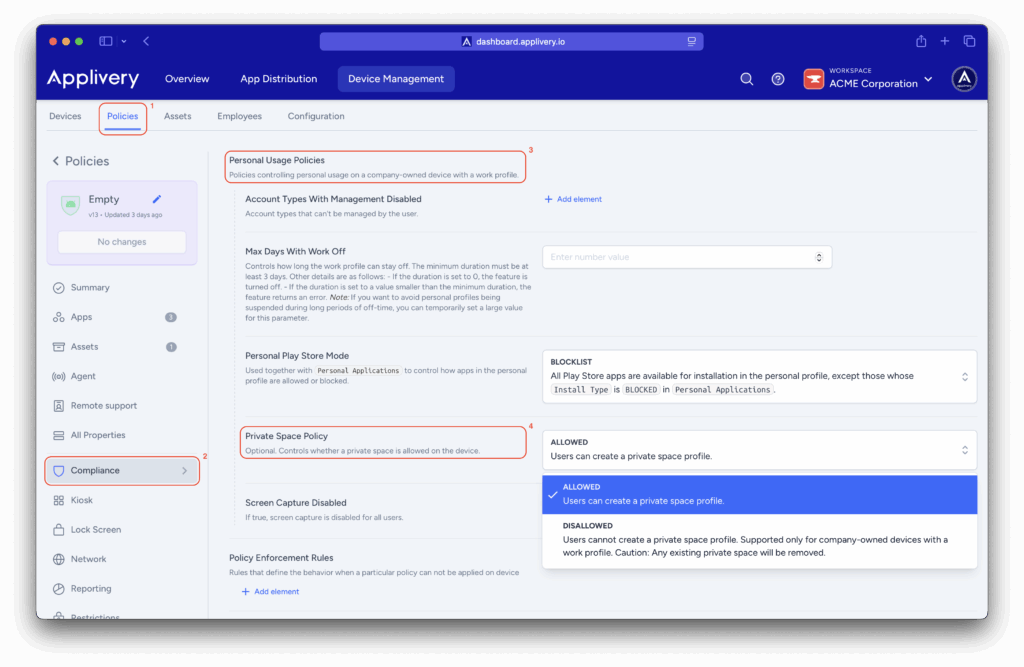
- Allowed: Choose this option if you want users to set up and use Private Space on corporate devices.
- Disallowed: Choose this option to prevent users from creating or accessing Private Space.
This hides the feature, and existing private spaces will be deleted.
Make sure this policy is assigned to all relevant devices (especially COPE devices). Once devices sync with Applivery (this may take a few minutes):
- If Private Space is disabled, users won’t see the option in Settings—and any existing space will be deleted automatically.
- If Private Space is enabled, users can access and set it up from their personal profile options.
Managing mobile devices with Applivery means you can finely control how corporate Android devices are used—balancing organizational security and user privacy.
Android 15’s Private Space showcases flexible mobile innovation.
By applying these policies, your company ensures COPE (Corporate-Owned, Personally-Enabled) devices meet security requirements while respecting employee privacy—a smart approach for a productive, secure workplace.