


During the enrollment of Android devices managed through Android Enterprise, it is often necessary to perform certain actions automatically during the initial configuration. These actions prepare the device before the user starts using it, ensuring compliance with organizational requirements for security, operations, and technical settings.
Setup Actions in Applivery allow IT administrators to execute these actions as part of the provisioning flow, providing consistency across corporate devices, mass deployments, or critical configurations that must be applied before the user interacts with the device.
Configuration #
Once in the Applivery Dashboard, navigate to Device Management > Policies (1).
Select the Android policy where you want to configure this setting. Then, go to the All properties (2) section in the left-hand menu and locate Setup Actions (3), then click the + Add element button.
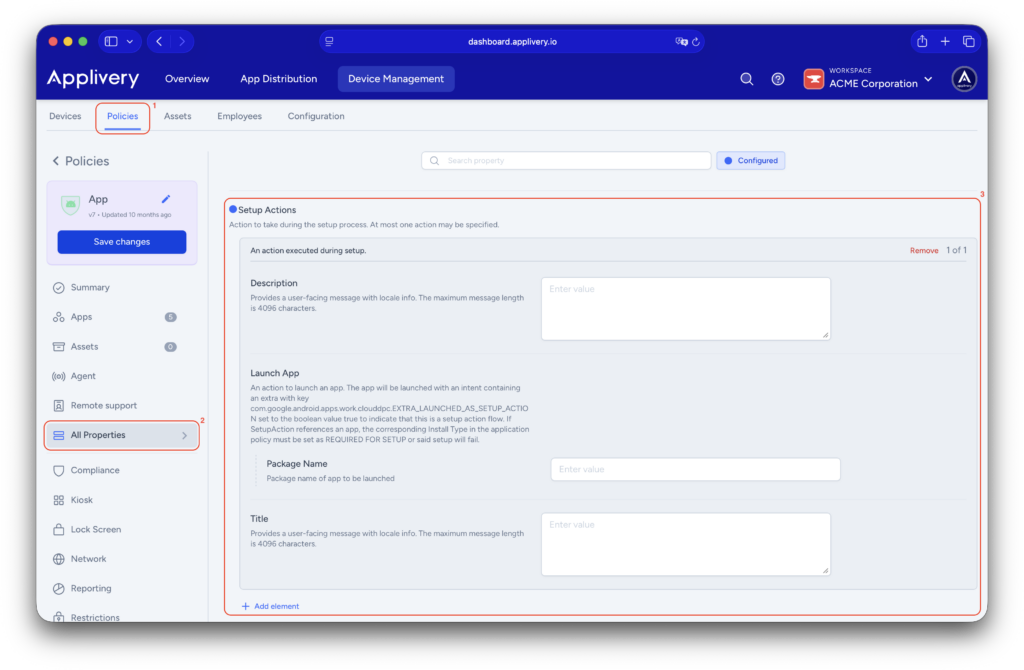
Each Setup Action requires defining a few key elements:
- Description (optional): Additional text displayed during the execution of the action.
- Launch App: This allows an application to run automatically during the device’s initial configuration. Specify the package name of the Android app to be executed (e.g., a corporate app, a security agent, or a configuration app such as com.slack).
- Optionally, include a Title message that will be visible to the user during setup, explaining what is being configured.
Important considerations #
- Single execution: Setup Actions run only during the first device setup. They will not repeat during subsequent policy updates or synchronizations.
- Supported devices: Setup Actions are intended primarily for Company-Owned, Fully Managed devices, or Zero-Touch / QR enrollment scenarios.
- Application dependency: If the action launches an application, it must be configured as REQUIRED FOR SETUP, and any failure during installation or execution will block the provisioning process.
- User experience: Actions run before the user has full access to the device, ensuring consistency but possibly increasing initial setup time.
- Recommended usage: Only use Setup Actions for critical configurations, apps required to complete onboarding, or automated provisioning workflows.
Additional setup actions can be implemented using Applivery’s Advanced Launcher in Kiosk mode with the Auto-start at first boot option, keeping in mind the inherent limitations of Kiosk mode.
Android Setup Actions in Applivery are an essential tool to automate and standardize the first boot configuration of managed Android devices. They ensure that critical applications and processes are executed immediately, reduce manual errors, and improve efficiency in corporate deployments.
When planned and applied correctly, Setup Actions enable a controlled, secure, and repeatable onboarding experience, particularly in environments with large device volumes or strict configuration requirements.