


Segments are a core structural component of Applivery Device Management. They allow organizations to replicate their real operational structure—such as regions, departments, stores, or business units—within the platform. Rather than being a simple filtering mechanism, Segments define administrative boundaries, visibility scope, and governance rules across devices, policies, resources, and automations.
By using Segments, organizations can scale Device Management while maintaining strict control over who can access and modify specific parts of the environment.
Through Segments, you can:
- Organize devices hierarchically.
- Delegate roles and permissions with precision.
- Scope visibility of policies, resources, and automations.
- Build complex deployment scenarios while maintaining strict governance.
What is a Segment #
A Segment is a logical container used to group and structure devices within a hierarchical tree. Segments can represent:
- Geographic regions.
- Organizational units.
- Operational domains.
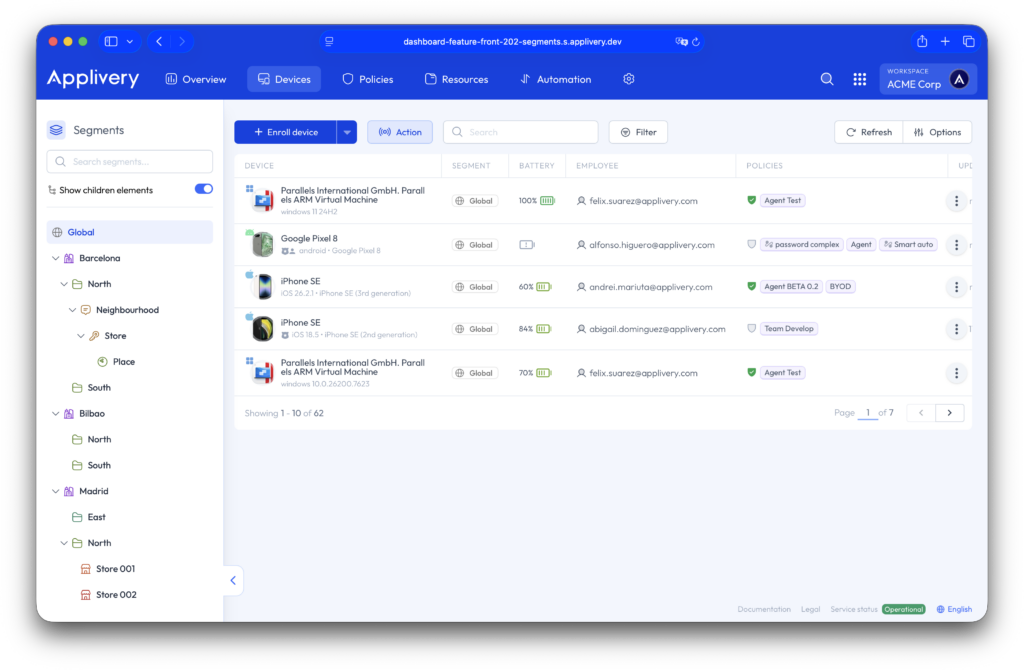
Each Segment can have child Segments, forming a tree structure. This hierarchy enables inheritance of visibility and administrative scope from parent to child levels.
Hierarchical structure #
Segments are organized in a parent-child structure. Administrators assigned to a higher-level Segment can manage all its descendant Segments, while administrators assigned to a lower-level Segment are restricted to that specific branch.
For example, a regional administrator may have full control over all stores within their region. In contrast, a store-level administrator can only manage devices, policies, and configurations within that store. They cannot access or modify configurations defined at the regional or global level.
This hierarchical model enables centralized governance with controlled decentralization.
Segment-based role delegation #
Each Segment can define its own permission groups and assign roles such as administrator, editor, or viewer.
Users can be added to these groups individually or dynamically through identity provider integrations (such as SAML, LDAP, or Active Directory). This allows organizations to automate access control based on corporate directory attributes.
Permissions are always scoped to the assigned Segment and its descendants. Users can only edit, view, or manage elements that fall within their authorized Segment scope. This ensures clear separation of responsibilities across distributed teams.
Segments across the Dashboard #
Segments apply consistently across the entire Device Management module. When working within a selected Segment in the dashboard:
- Devices are filtered according to that Segment.
- Only policies belonging to that Segment (and optionally its descendants) are visible.
- Resources and automation rules follow the same scoping logic.
Each element in the platform is associated with a specific Segment. This association determines who can manage it—not necessarily which devices receive it.
Segments and device assignment #
Every device belongs to a specific Segment. This assignment determines which administrators can manage the device and which configurations are visible in its context.
However, Segment membership does not automatically define which policies a device receives. Policy delivery is controlled through Automation Rules and Device Audiences. Segments define who can configure those rules and policies, not the final configuration outcome itself.
This separation ensures operational flexibility while preserving governance boundaries.
Policies and priorities #
Segments enable advanced deployment scenarios when combined with identity groups, Device Audiences, automation logic, and policy priority.
For example, a device located in a specific store may inherit a global baseline policy, a regional configuration, and a store-specific customization. If the device is associated with a user belonging to a particular department, additional policies may also apply.
Policy priority ensures deterministic behavior in the event of configuration overlap. Segments define administrative ownership, while policy priority defines technical resolution.
Visibility and inheritance rules #
The following principles govern Segment behavior:
- Higher-level administrators inherit visibility over lower-level Segments.
- Lower-level administrators cannot modify parent-level configurations.
- Editing rights are always restricted to the assigned scope.
- Visibility can be limited to a specific Segment or expanded to include its descendants.
This model supports enterprise-grade governance, making Segments especially valuable in large or distributed organizations.
How to create Segments and Permissions #
Step 1 - Create a Segment #
Once in the Applivery Dashboard, navigate to the Settings (1) section. From the left side menu select Segments & Permission (2) and click the + Create child button (3).
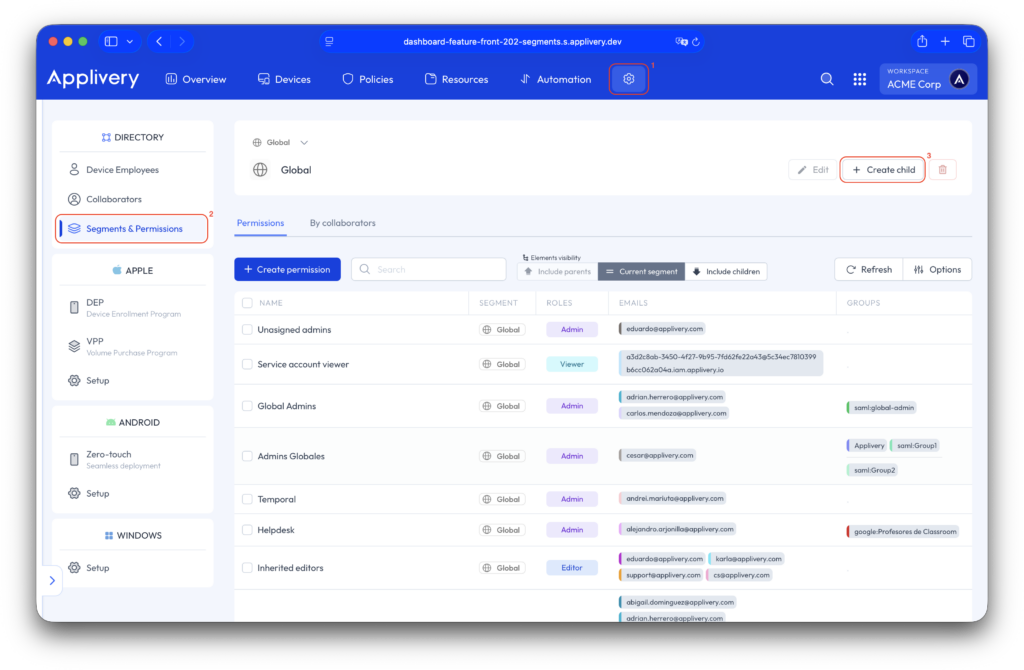
A form will appear allowing you to define the Segment name, select an icon, choose a color, and preview how the Segment will appear within the hierarchy before saving it.
Step 2 - Create Permissions #
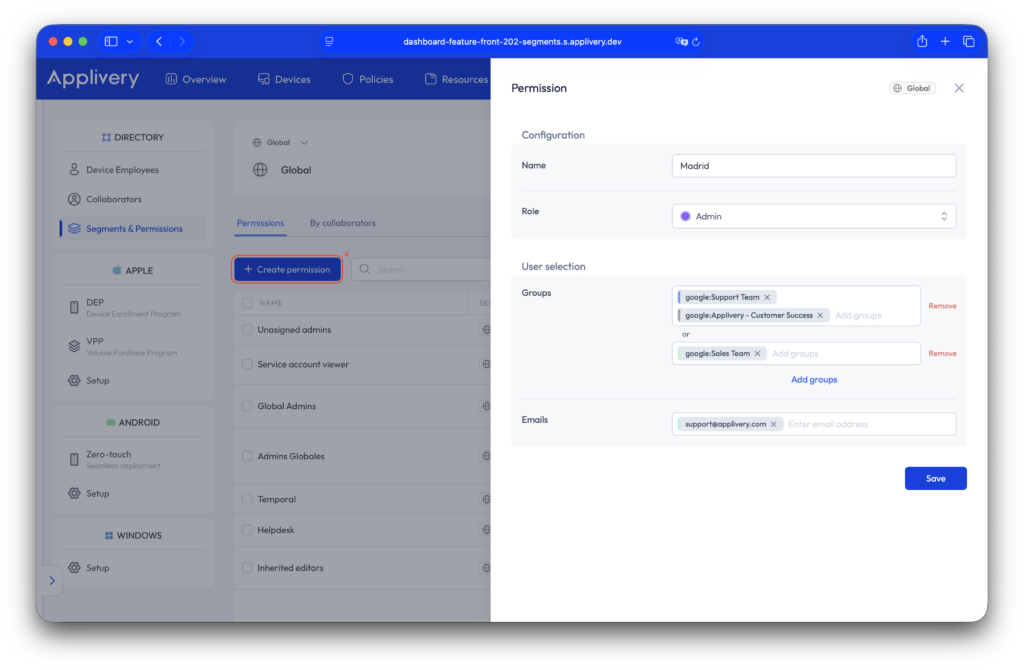
Now, in the same section, click the + Create permission button (4). In the side modal that appears, you can give the permission a name and assign a role. From here, you can add segment administrators by including groups using AND or OR logic, or by entering individual users’ email addresses directly.
Best practices #
When designing your Segment structure:
- Align it with real operational boundaries rather than temporary projects.
- Keep global or baseline configurations at higher levels, and apply local customizations at lower levels.
- Use identity-based group mapping whenever possible to avoid manual access management.
Careful planning of the Segment tree significantly improves scalability, clarity, and long-term maintainability.