


Applivery provides a very powerful way to distribute Apps using Public or Private App Stores that support multiple security and branding configurations. Additionally, we also provide the possibility of having different configurations for each App and each User.
Below we will go through the different options provided by the platform. Please read it carefully since they represent the most important concepts in Applivery.
App Stores #
Applivery supports both Public and Private App Stores.
Public App Stores:
- Your App Store is totally public and available under your URL: (
yourname.applivery.comor your Custom Domain). - Anyone knowing the URL of the App will have access to the list of Published Apps, as long as they are not unlisted or inactive.
- Your App Store and its content might be indexed by search engines like Google or Bing.
Private App Stores:
- Your App Store is not available to the general public. Users will be asked to enter their credentials to access the list of Apps.
- Users can log in using their Applivery Account and/or the Single Sign On of your Workspace (if available).
- Private App Stores’ homepage might be indexed by search engines like Google or Bing.
In the Security section, disable the Allow Public Publications option. If any public publications already exist, you’ll see an alert notifying you and will have the option to remove them.
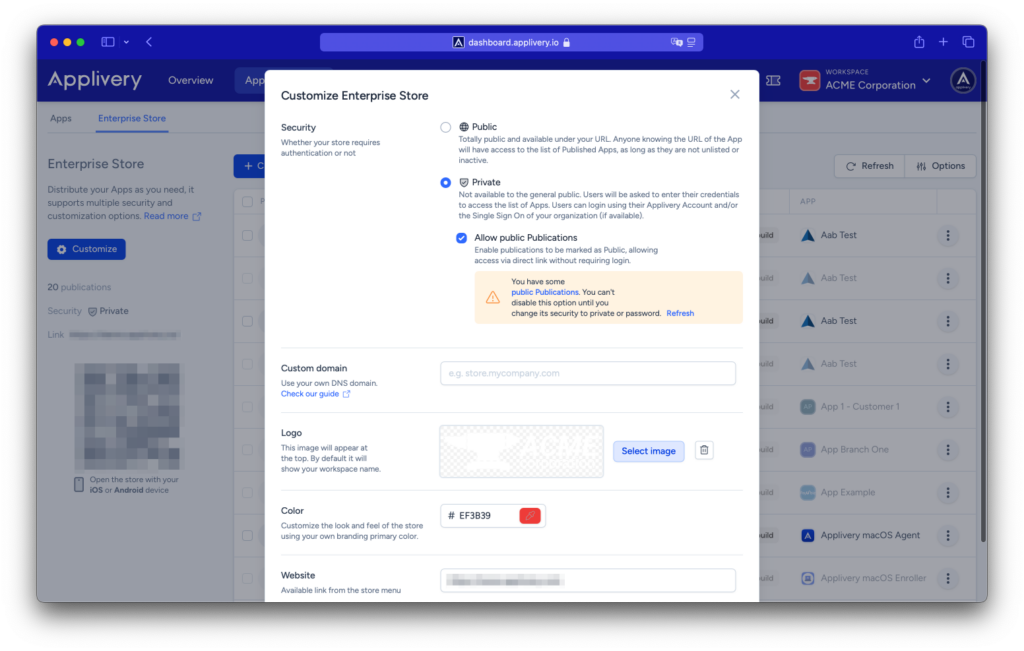
In both cases, users will be able to Add the App Store to their Home Screen to have more direct and easy access to your Workspace Apps.
Published Apps #
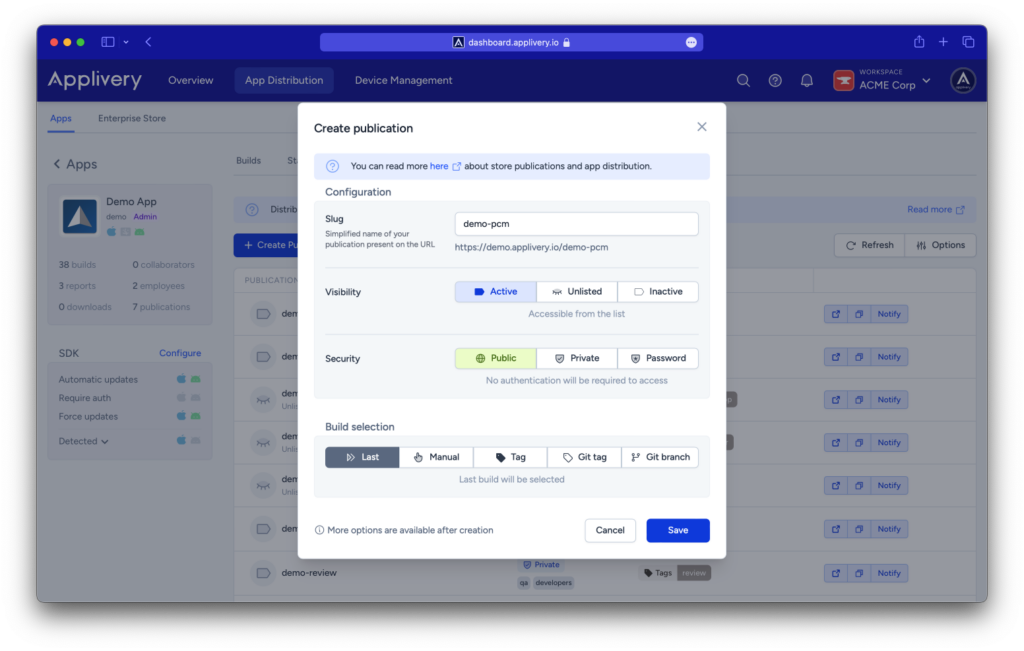
For each App (project) you have in Applivery you will be able to have one or more Published Apps that will help you organize how your Apps are available within your project Collaborators and Employees through the App Store. There are three important concepts to properly configure them:
Type of publication #
- Manual: distributes a specific iOS and Android build from the list of builds. It does not support enabling the history of builds.
- Tags: use the custom tags of your build to distribute any App that matches a tag or set of tags.
- Git Tag and Git Branch: deploy any build that matches the provided git branch (i.e.:
develop) or Git Tag (i.e.:3.2.1). - Last: deploy the very last build you have uploaded for each operative system.
Visibility #
- Inactive: The app is not accessible to anyone in the App Store.
- Active: The app is visible to everyone in the App Store.
- Unlisted: The app is not visible in the App Store but is accessible to anyone knowing the URL.
Security #
- Public: no authentication or login is required to access the App details and installation.
- Private: authentication and log in (either Applivery login or Custom Single Sign On) will be required to access the App details and installation.
- Password: a password (defined by you) will be required to access App details and installation.
Advanced configuration #
Restricting access to certain User Groups #
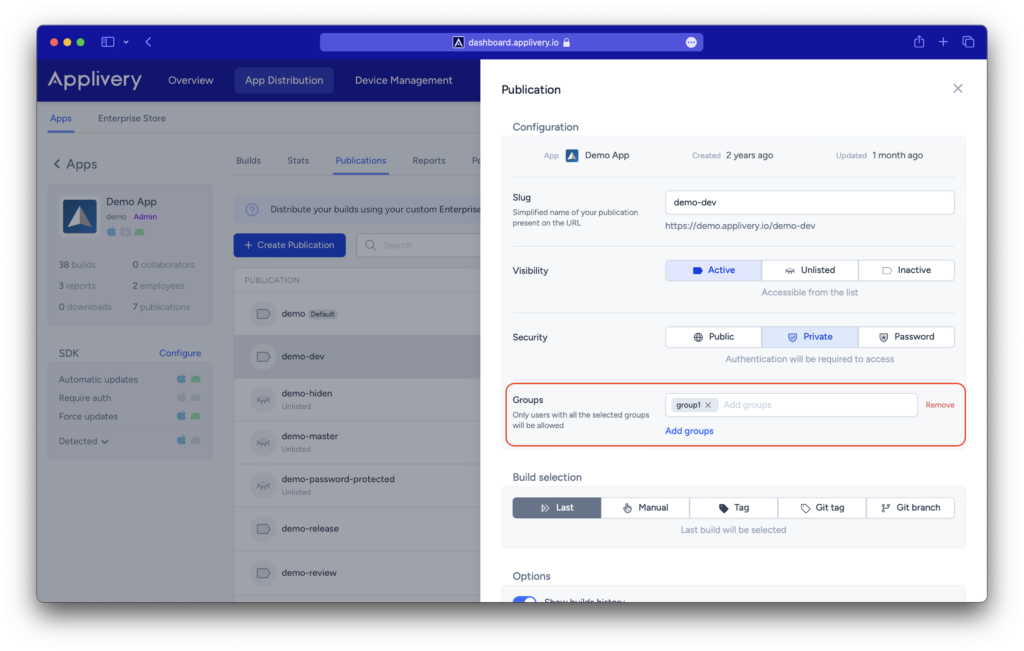
When configuring Private Published Apps (either using Applivery Login or Single Sign-On) you can also specify which user groups will have access to the App itself. To do so, add the list of user groups below the Security Selector and then click Save.
Blocking or allowing access to certain countries #
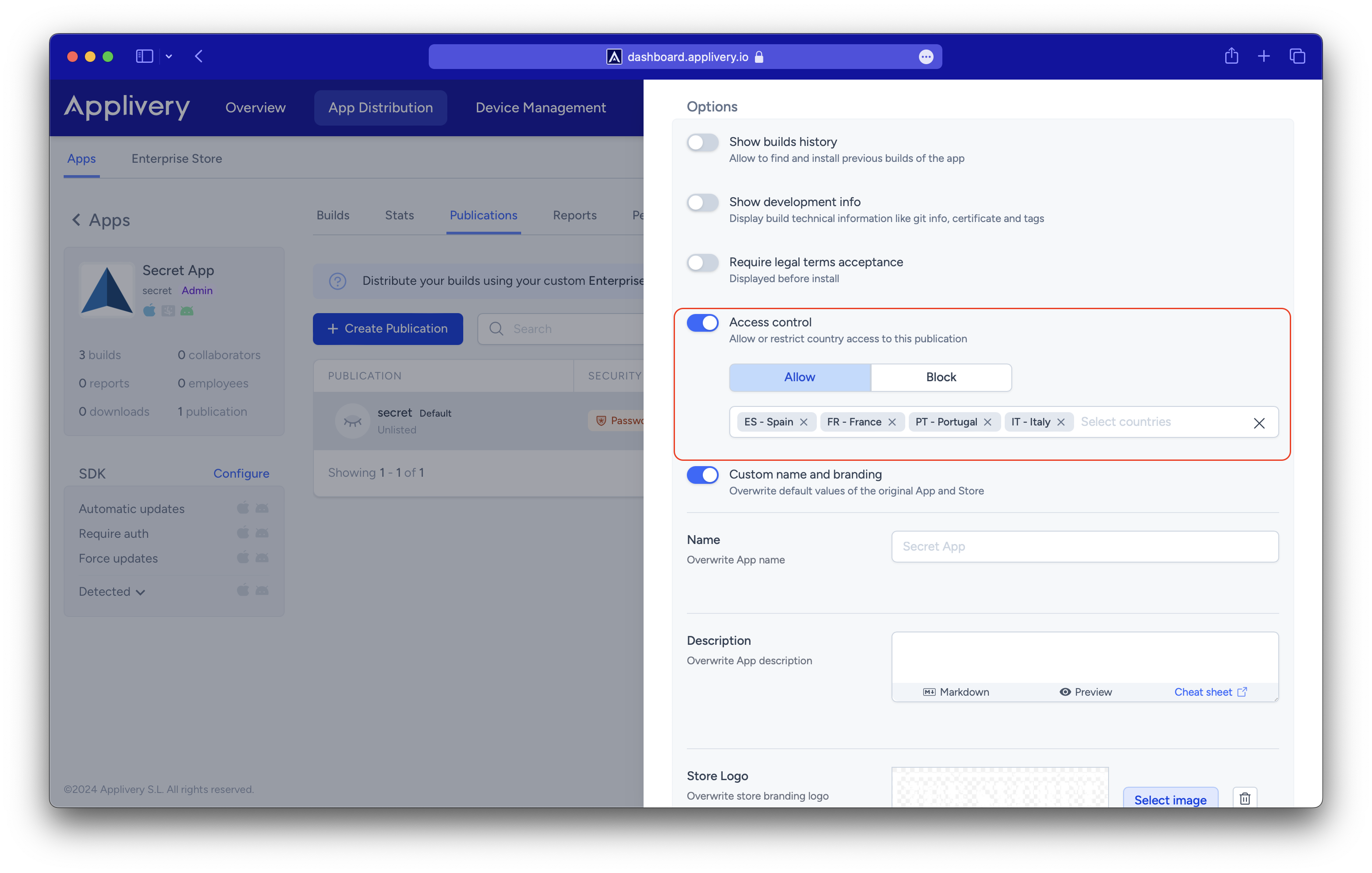
You also have the option to define the countries that will be granted access to or blocked from the App publication. To do this, include the list of countries in the Access control setting, specify the required ones, and then click Save.
Best practicies #
Use separate Publications for different Audiences #
When distributing your app to different groups (e.g., internal testers, QA, clients, or partners), create separate publications for each audience. This allows you to manage access and visibility independently and keep your distribution workflow organized.
Use Last Build Sselection for continuous updates #
If you frequently upload new builds, avoid creating a new publication for each one. Instead, create a publication with Build Selection = Last.
Then:
- Select the publication.
- Enable Show builds history.
This configuration allows you to maintain a single publication that always points to the latest build, while still giving access to previous builds through the build history.
You can also share or access a specific build by appending the following to the publication URL: demo.applivery.io/{pubSlug}/{OS}/{buildId}
This approach keeps distribution simple while preserving access to historical builds when needed.